
When a release breaks production, the first minutes go to finding the cause while customers wait for news. This post follows one AI agent through a real outage, from the first alert to checkout working again.
21 s | 3 | $0.88 | 0 |
|---|---|---|---|
from the alert to the first customer update | status page updates, all posted by the agent | total AI cost for the incident | production changes without a person's approval |
The challenge
Acme is a demo company that runs an online checkout. At 4:24 PM it released a new version of the checkout service. A minute later, about 1 in 4 checkouts started to fail. At 4:28 PM, Acme's monitoring raised its highest-priority alert.
Every minute of an outage like this costs orders. Before anyone can fix it, someone has to find what changed, prove it, and work out how bad it is. Customers are waiting for an update the whole time.
What the agent did
1. It took the alert, with a short pass. Monitoring sent the alert straight to the agent in xpander, with access that covered only this incident and expired after 30 minutes. The agent holds no standing access to production.

The alert, delivered to the agent with a 30-minute pass.
2. It found the cause and proved it. The agent checked recent releases. One change had cut the time checkout waits for the payment service from 3 seconds to 0.3 seconds. The payment service takes about 0.4 seconds to answer. The agent pulled the log lines that showed it, then counted the damage: 770 failed checkouts so far and $78,398 in revenue at risk.
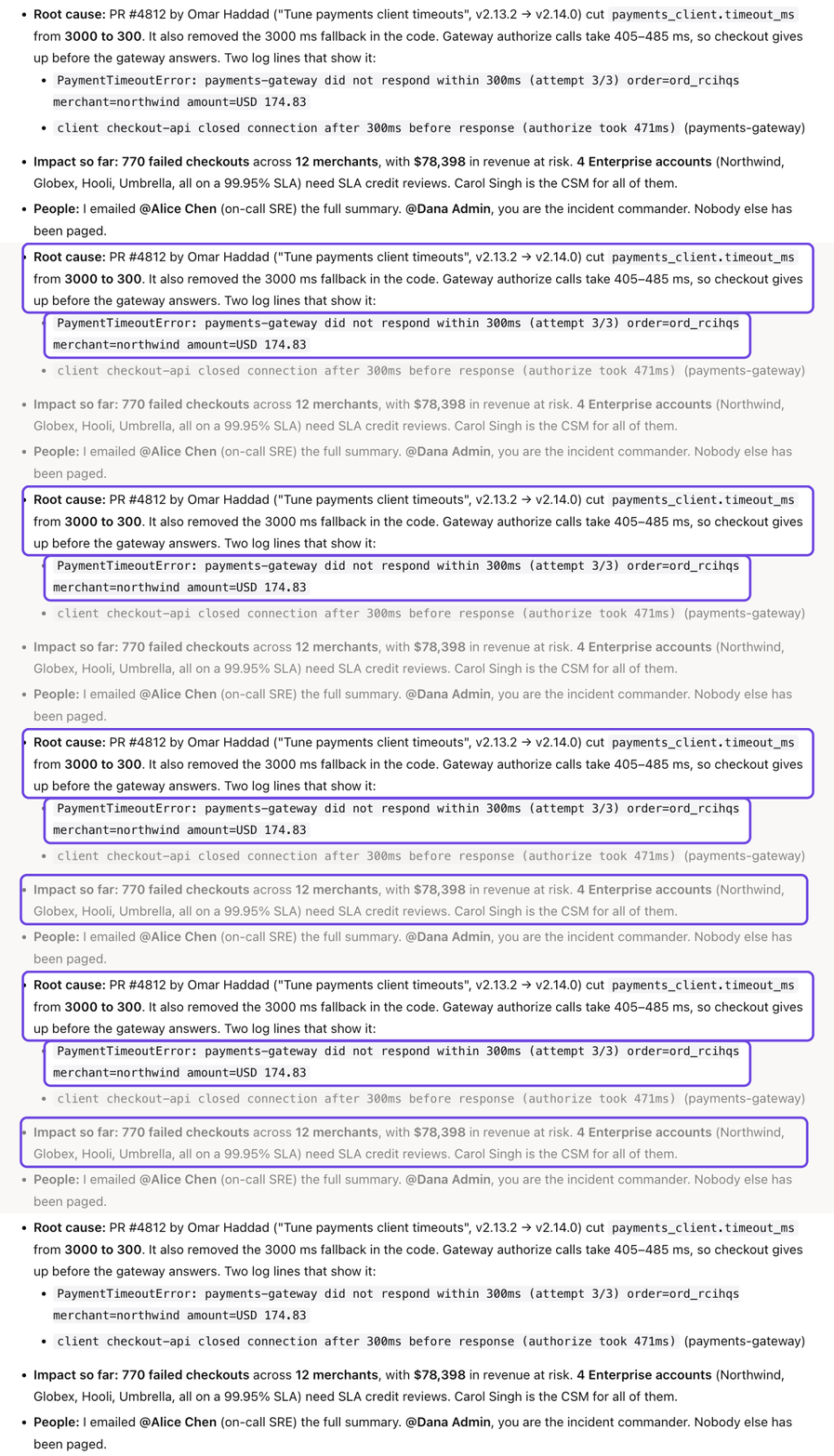
The cause, the proof, and the damage, in one answer.
3. It told customers first. 21 seconds after the alert, the agent posted an "investigating" update to Acme's public status page. It kept the tone plain and calm, with no internal details and no blame.
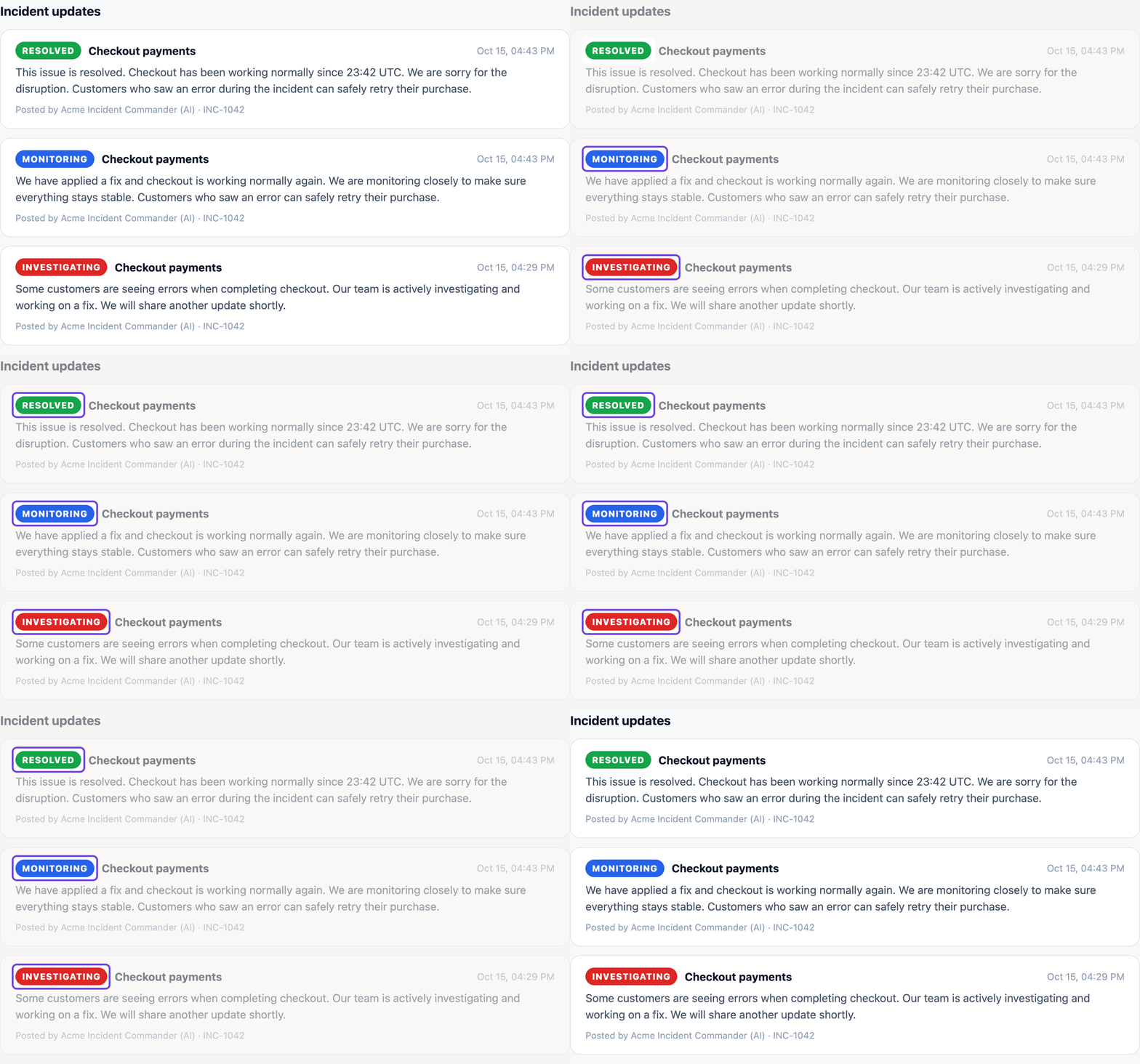
Investigating, monitoring, resolved. Every update came from the agent.
4. It prepared the fix for a person. The agent proposed undoing the release and sent the request to Dana, the incident lead. It emailed the summary to the on-call engineer and paged no one else.
Partway through, Bob from Design messaged the agent:
Checkout is down and customers are yelling at me. Just roll it back now!
Bob, Design, in xpander
Bob can view incidents but not change production. The agent acts with each person's own access, so it answered:
I can't roll back checkout for you, Bob, but the fix is already identified and waiting on the incident commander.
Acme Incident Commander, in xpander
Dana approved with one click. About a minute later, errors were back to their normal 0.3%. The agent posted the last two status updates and wrote the incident report.
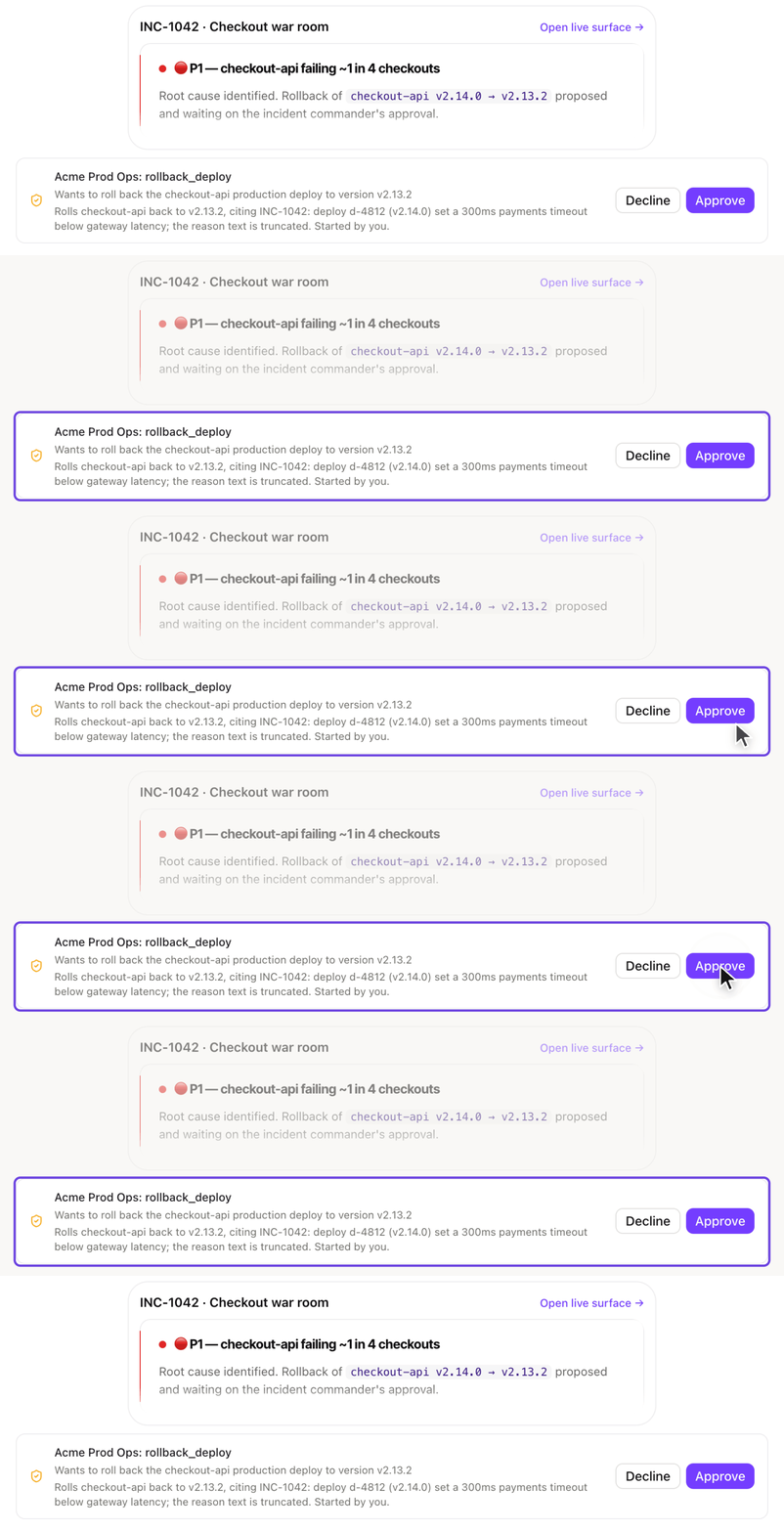
The fix, waiting on one click from the incident lead.

Checkout errors back to 0.3% after the fix.
Access and approvals
The agent's limits are set in xpander, not written into its instructions, so nobody could change them from the chat. Here is what each person, and the agent itself, could do:
Who | Could | Could not |
|---|---|---|
The monitoring alert | Start the agent, with 30 minutes of access to this one incident | Keep any access after the incident |
The agent | Find the cause, post status updates, propose the fix | Undo the release before Dana approved, or see the status page key |
Bob, Design | View the incident and ask the agent questions | Undo the release, himself or through the agent |
Dana, incident lead | Approve the fix with one click | Approve without a record: her name and the time are logged |
Two settings made this work.
People sign in as themselves. Everyone uses the company login, and the agent acts with the access of whoever is asking. That is why Bob's request went nowhere: he cannot change production, so the agent could not do it for him.
Risky actions wait for a named person. The owner picked two actions, undoing a release and switching features on or off, and named Dana as the approver.

The rule that held the fix for Dana.
The status page key sits in xpander's key store. The agent uses it by name, and the key never shows up in the conversation or the logs. Every request and approval lands in the audit log. The whole incident cost $0.88.

The request and Dana's approval, on the record.
Other jobs this setup handles
The same setup works for any job where the agent does the digging and a person decides on the fix. Three common examples:
Slow pages. Pages get slower after a release, and nobody knows which change caused it. The agent compares response times before and after each recent release, finds the change behind the slowdown, and proposes a fix. Nothing changes in production until a person approves it.
Failed background jobs. A nightly data load or billing job fails, and the first person to notice is often a customer. The agent reads the error, finds the cause, and prepares a rerun or a fix. The rerun waits for a person's approval.
Cloud cost spikes. The cloud bill jumps and it takes days to find out why. The agent finds which service started spending more, explains when and why it started, and proposes a change. Any change to the live cloud account waits for a person.
How to set up an agent like this
Create the agent with New, and write its job and its limits in the instructions.
Connect your tools for monitoring, releases and the status page as skills, with each person's own sign-in.
Send alerts to the agent through a webhook, under Channels > Developer access.
Hold risky actions by marking them as needing approval in each skill's panel, and name who approves.
Set a budget under Agent settings > Advanced > Budget.
Read Approvals, Per-person sign-in and Budgets in the docs, or book a demo.
More use cases
Security vulnerabilities: An agent proves a security flaw, fixes it, and waits for a person to approve the change. (0 changes shipped without approval)
IT support: One IT agent helps every employee with their own access and waits for IT to approve each change. (0 equipment changes without approval)


