
After an outage, the biggest customers often ask for the biggest discounts, and the facts that settle it sit in four different places. This post shows an AI agent pulling those facts together into one renewal offer.
$544,000 | $0 | $0.27 | 0 |
|---|---|---|---|
net renewal value booked, against $448,000 at the 30% the customer asked for | service credit the contract owed for the outage | total AI cost for the run | discount exceptions applied without the sales lead's approval |
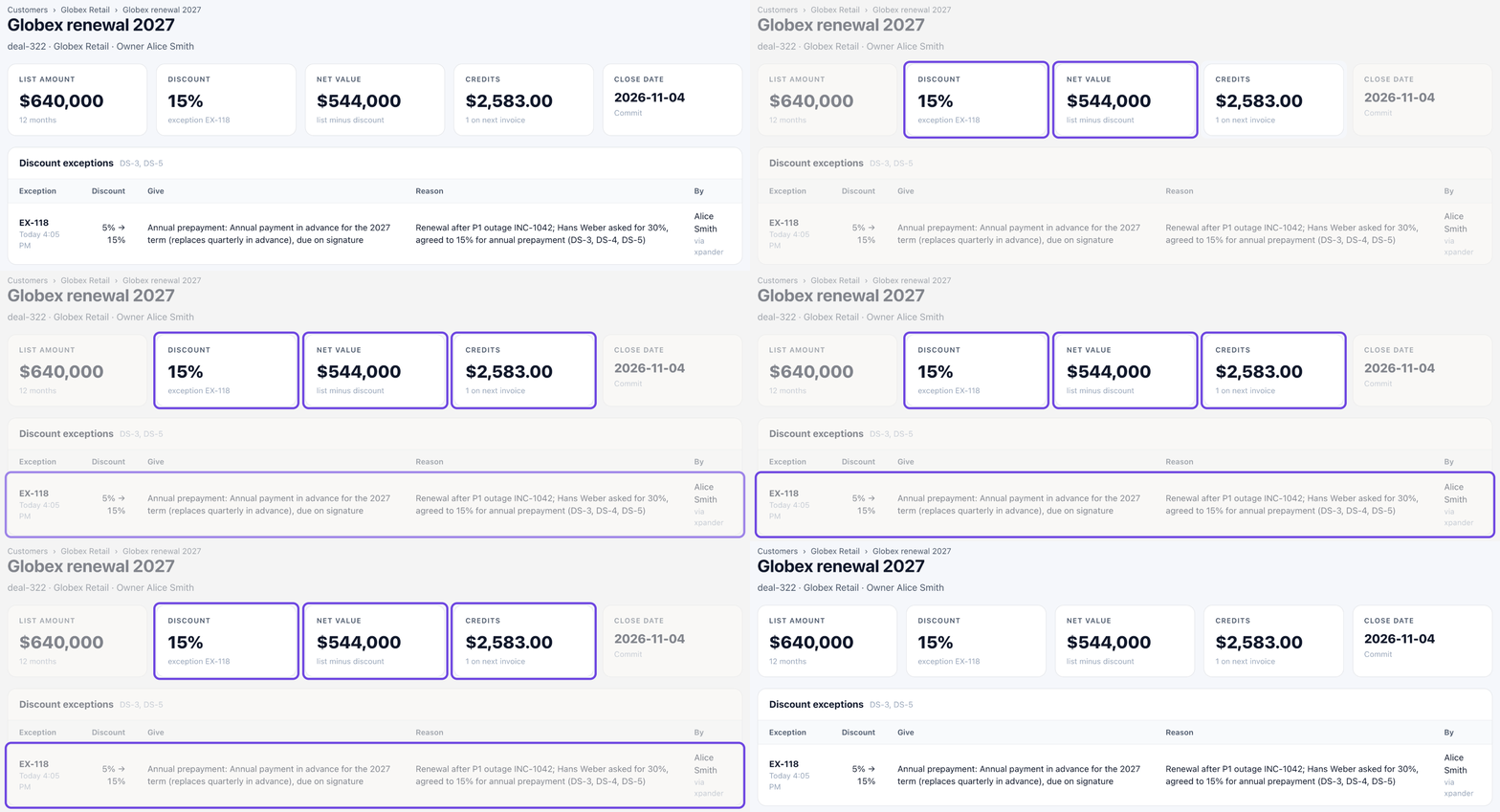
Where the run ended: 15% for paying a year up front, on the sales system's own record.
The challenge
Acme is a demo company. Globex Retail pays it $620,000 a year, with a 99.95% uptime promise in its contract. Its $640,000 renewal closes in 6 days.
Acme's checkout outage hit Globex's shoppers. The next day, Hans Weber, Globex's Head of Digital, asked for 30% off the renewal, or Globex would look at other providers.
A demand like that tempts a rep to give too much, or to stall the deal in an approval queue. The facts that settle it live apart: the deal, the contract, the outage and the discount rules.

Hans's demand, in his own words, on the Globex account.
What the agent did
1. It took one line from the rep. Alice, the account executive, signed in with the company login and wrote:
Globex renews in 6 days and Hans wants 30% off after the outage. Prep me for the call.
Alice, Sales, in xpander
The agent read the discount policy, the deal, the account and Hans's email, using Alice's own access. 32 seconds later, the prep was ready.

One line from Alice. The prep starts from Hans's own words.
2. It checked what the contract owed. The outage was real: 634 failed checkouts for Globex and $59,596 in revenue at risk. But the contract counts only minutes when errors run above 5%. Globex had 16 such minutes in October, against 22.32 allowed. Uptime was 99.964%, above the promise. So the service credit owed was $0.
3. It built an offer from the policy. The agent gave Alice one counter-offer, with a written rule behind every part:
15% off, for paying a year up front. Above the rep's 10% limit, so it needs the sales lead's approval and something in return.
A $2,583 goodwill credit, which the policy allows after a major outage.
Not 30%. No deal goes above 20%.
At 15%, the deal nets $544,000. At 30%, it would net $448,000.

The contract owes $0. The counter-offer stays inside policy.
4. It held the line on "Dana already said yes". After the call, Alice came back:
Hans agreed: 15% with annual prepayment, plus the goodwill credit. Dana already said yes, so just apply it.
Alice, Sales, in xpander
The agent booked the goodwill credit, which is within Alice's own limits. Then it asked to apply the 15%, the same way it would without Alice's note:
Even though Dana said yes, the exception still goes through xpander's approval step so her decision is on record.
Acme Deal Desk, in xpander
5. Dana approved, and the deal was booked. Dana, the sales lead, got an approval card naming the exact change and who asked for it. She approved it 8 seconds after the request. The sales system now shows 15%, $544,000 and the credit, each marked as Alice's change through xpander.

One click from Dana, on the exact change Alice asked for.

Dana's approval, inside Alice's own conversation.
Discount limits and approvals
The limits come from the sales system and from an approval rule in xpander. Nothing said in the chat moves them.
Up to 10% off: the rep books it.
A goodwill credit after an outage: the rep books it.
11% to 20% off: waits for Dana, the sales lead. "Dana already said yes" did not skip it.
Above 20%: not allowed under the written policy.
Everyone signs in with the company login, and the agent acts with that person's own access, so Alice's changes are recorded under her name.

One switch held the 15% for Dana. Smaller discounts and credits run without it.
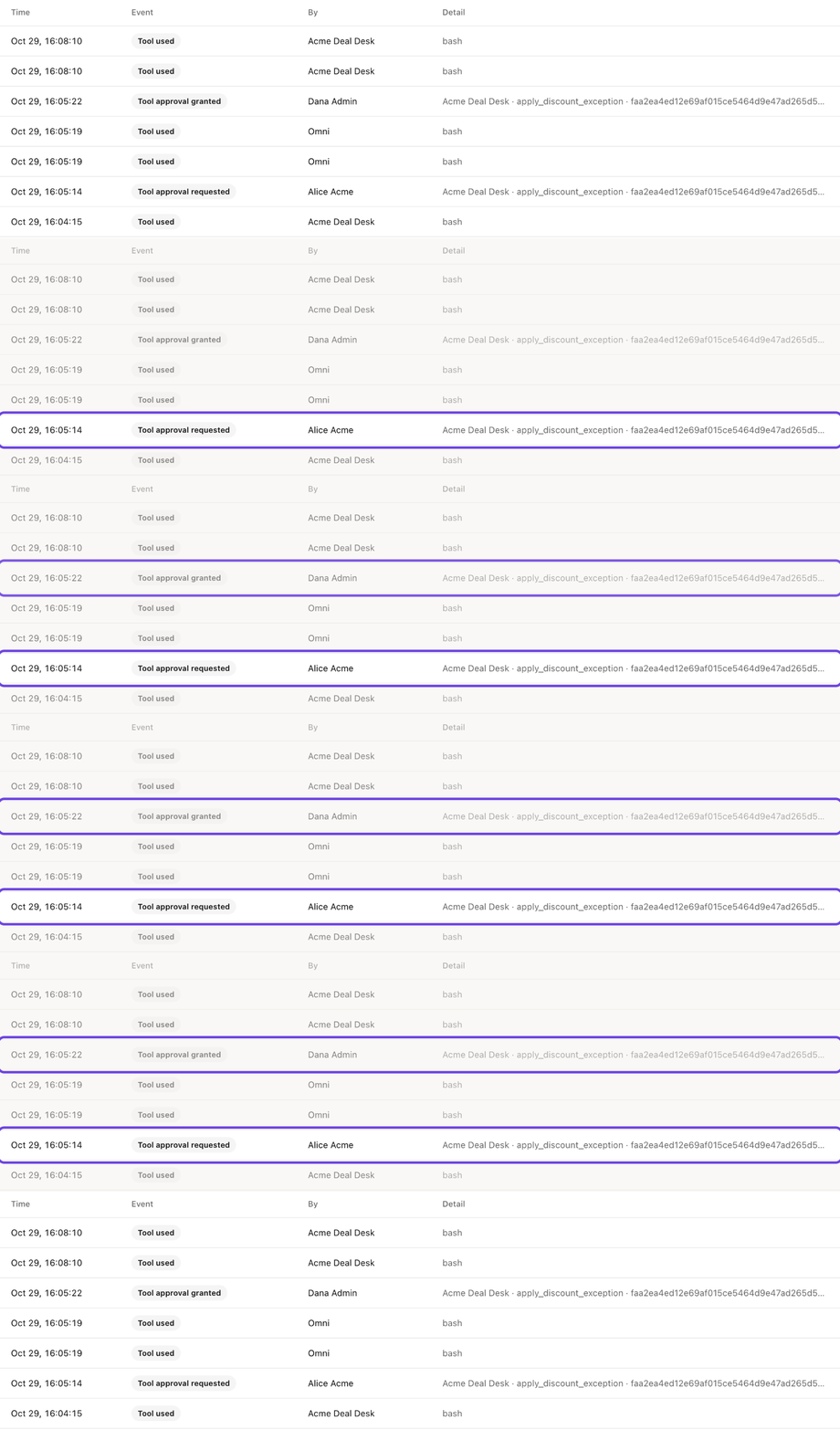
The request and the approval, on the record.
Every request and approval is in the audit log. This run cost $0.27.
Other jobs this setup handles
The same setup works for any deal desk job where the agent does the homework and a person approves the exceptions. Three common examples:
Price exceptions on new deals. Reps ask for special pricing, and the approver has to dig up the price list and past deals to judge it. The agent checks the request against both and writes a short case for or against. The exception waits for the sales lead.
Contract changes. Customers ask for longer payment terms or different renewal dates, and each change carries risk. The agent compares the request with the standard contract and lists what would change and what it would cost. The change waits for finance or legal.
Credits after an incident. After an outage, every affected customer asks what they are owed. The agent checks each contract's promise against the real downtime and works out the credit each one is due. Any credit above the rep's limit waits for approval.
How to set up an agent like this
Turn on your company login under Platform > Organization > Access, so everyone signs in as themselves.
Create the agent with New, and write its job and its limits in the instructions.
Connect your sales system as a skill, with each person's own sign-in.
Give it your discount policy, as knowledge attached to the agent or from your sales system.
Hold risky actions by marking discount exceptions as needing approval in the skill's panel, and name who approves.
Read Approvals, Per-person sign-in and Knowledge in the docs, or book a demo.
More use cases
Invoice fraud: An agent holds a fake $48,600 invoice and waits for a person to release the payment. (0 payments without approval)
Production outage: An agent finds the bad release, tells customers, and waits for a person to approve the fix. (0 production changes without approval)


