

You built an MCP server behind your own OAuth (we tested with Keycloak). Now people want to use it from an AI agent. The usual options put a token on every laptop, or share one service account. xpander does neither.
On xpander, each person signs in once with your identity provider. xpander keeps their token in your cluster and adds it to every call. Your server sees the real person and applies their permissions. We tested it on a self-hosted install: Alice and Bob asked the same agent "What equipment do I have?" and each got only their own items. When Alice asked for Bob's items, your server refused. All screenshots are from the Acme install. Display names changed from test labels. All data is unchanged.
Where AI clients put your tokens
You already did the hard part: an MCP server that checks OAuth tokens. The problem is what each AI client does with those tokens.
A desktop AI client such as Claude Code signs in on each laptop and keeps the token on that machine: in the macOS Keychain, or in a credentials file on Linux and Windows. The token sits next to an agent that can run shell commands, and the token is outside any central control.
A SaaS AI client runs outside your network. It cannot reach a private or air-gapped MCP server.
A shared service account works, but every person then sees what that account sees, and your audit log shows one user.
A token tool such as Arcade or Aembit can hand an agent each person's token. You still have to run the agent, share it with your teams and govern it.
How it works on xpander
Each person signs in once. The first time a request needs the MCP server, the chat shows a sign-in card. If the person already signed in to xpander through the same identity provider, they do not type a password.
xpander keeps each person's token. It stores the token, refreshes it, and adds it to each call at run time. The agent never sees it.
Your MCP server decides. It reads the person from the token and returns only what that person may see.
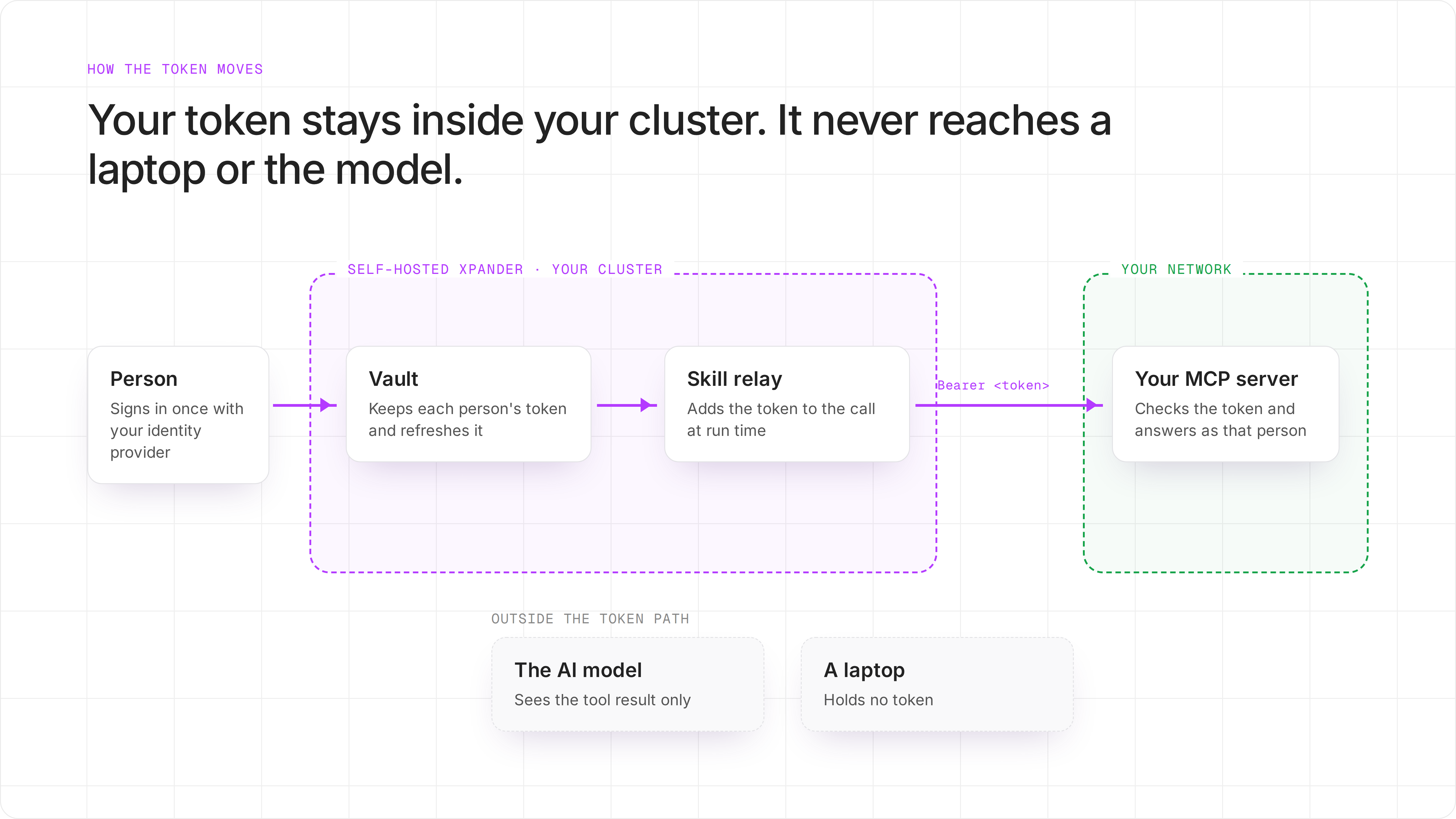
Where the token lives. The model only ever sees the tool result.
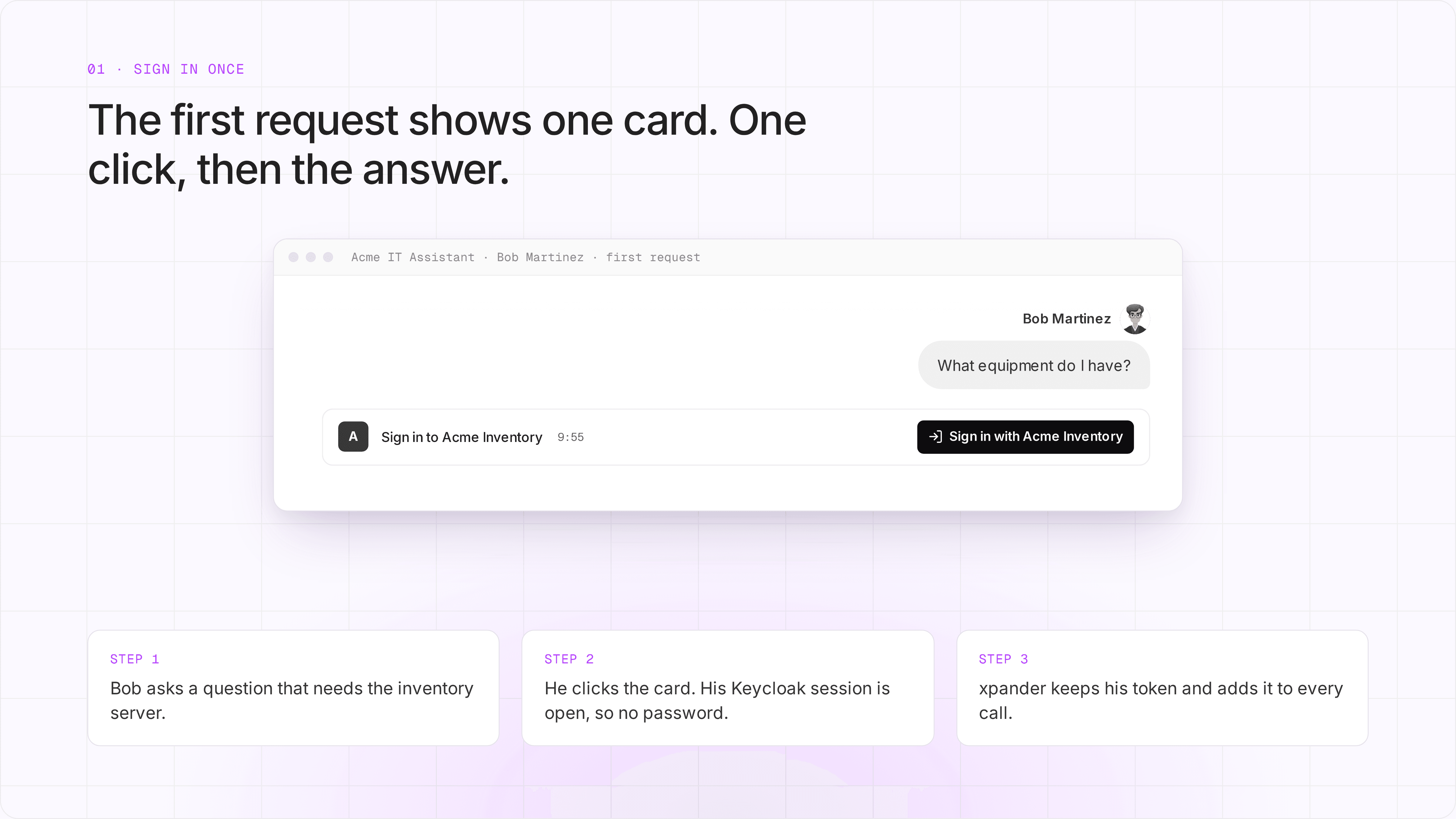
Bob's first request after he disconnected Acme Inventory.
What we ran
A self-hosted xpander install for a sample company, Acme, with its own Keycloak.
One shared agent, "Acme IT Assistant", on Claude Code with Opus 5.5.
One MCP server, "Acme Inventory", that checks each token.
Two employees: Alice (Engineering) and Bob (Design).
The proof: the agent sends no name
Here are the two tool calls from the run log. Both calls have the same empty input: {}. The agent did not tell the server who was asking. The server still returned Alice's items to Alice and Bob's items to Bob. Our server reads the person from the token.

Real run logs from the Acme install. Output cut after the first line.
The refusal comes from your server
Alice then asked the agent to look up Bob's items. The agent sent Bob's email to the inventory server. The server refused with "alice@acme.xpanderlabs.com cannot view bob@acme.xpanderlabs.com's…" and named Alice as the person who asked. The agent did not make that choice. Your server did.
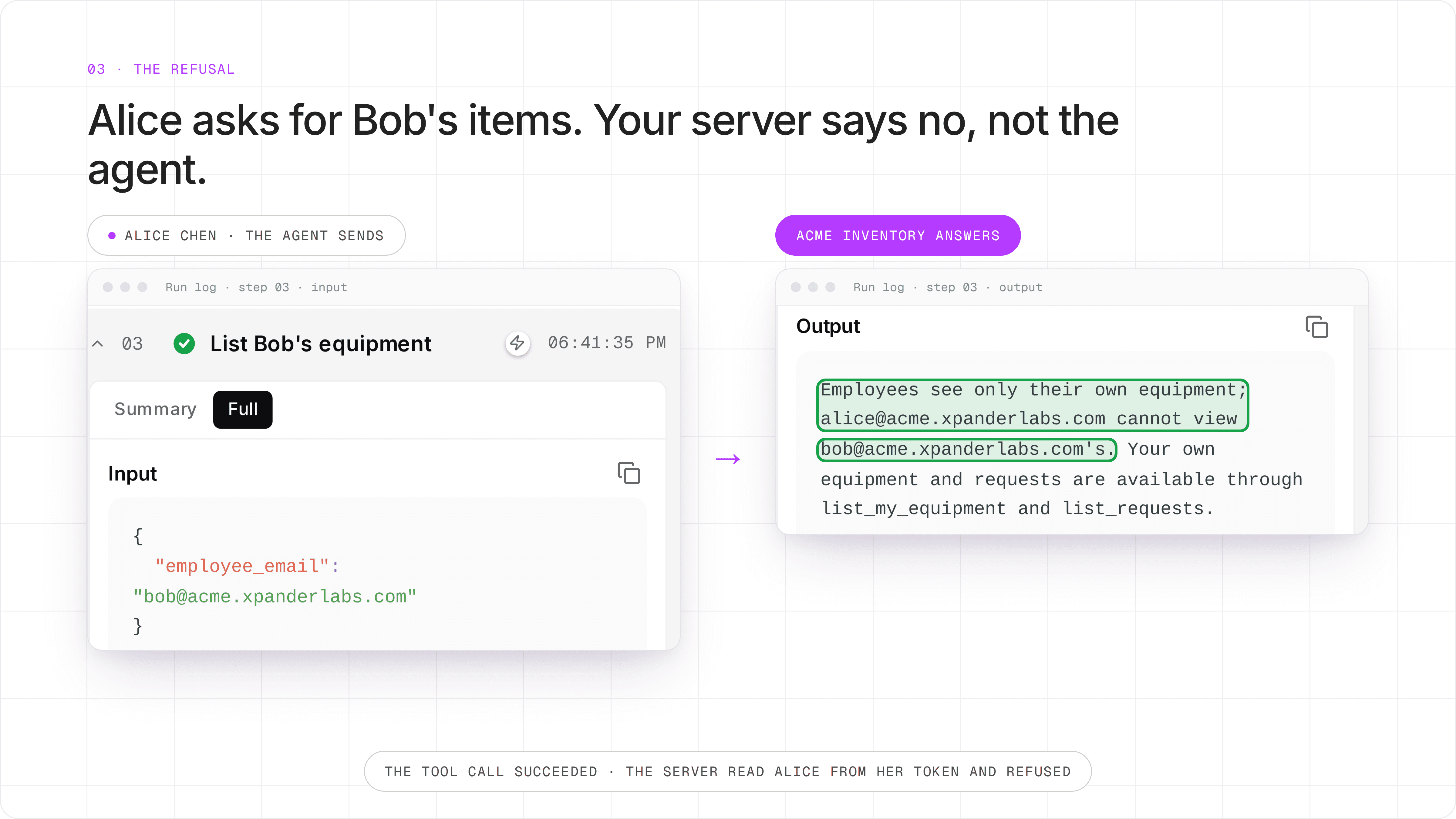
Real run log for Alice's third request. The tool call succeeded, and the server returned the refusal as its answer.
What this does not cover
This page is about calls to your systems. Two other paths also matter:
Conversations. On xpander, a conversation is a work session, not a security boundary. People who can use the same agent can open a conversation if they have its link. So the per-person check lives in your systems.
The agent's computer. One agent has one computer for all its conversations. Each conversation gets its own folder, but all conversations run as the same user on that computer. So a file the agent saves in one conversation can be reached from another. Do not ask the agent to save sensitive tool results to files.
What you build
If your MCP server already checks OAuth tokens, most of the work is done.
Already in place on a server that checks OAuth: it verifies each token, reads the person from it, and answers a missing or bad token with 401.
One thing to check on your server: xpander reads /.well-known/oauth-authorization-server on the server's own origin and requests exactly its scopes_supported. If your server does not publish that document yet, add it.
New on xpander:
Turn on MCP sign-in on your self-hosted install. Set
CLIENT_AUTH_EXTERNAL_URLin your Helm values.Create one client in your identity provider: confidential, authorization code flow, with the xpander callback and the
offline_accessscope.Register the MCP server for the organization, with OAuth2.
Attach it to a shared agent and give the agent access for the whole organization.
After that, people sign in once, and xpander keeps their tokens fresh.
Try it
Read the full setup in Per-person sign-in for MCP connectors. To see it on your own systems, book a demo.


