
Update, October 25, 2026: xpander does not run agents in NVIDIA OpenShell sandboxes today. Each agent turn runs in xpander's own sandbox, as the agent's own user, with a seccomp filter. We will update this post if that changes.
On September 28, NVIDIA announced the Open Agent Safety Platform, with OpenShell at its core: an open-source runtime that runs each AI agent in its own sandbox and enforces what it may access from outside the agent.
xpander brings custom AI agents to the whole organization. It builds and runs agents for business functions, on any model and harness, in your own environment, and governs them with single sign-on and user groups, approvals, audit, a model gateway and budgets. Now, in private preview, xpander runs each of those agents in its own OpenShell sandbox. xpander runs and governs the agents; OpenShell sandboxes them.
What NVIDIA OpenShell is
NVIDIA OpenShell is NVIDIA’s open-source runtime for AI agents, licensed under Apache 2.0. It runs each agent in its own sandbox and enforces what the agent may access, from its files to its network, from outside the agent. Anything the policy does not allow is denied, and network rules can change while the agent keeps working.
NVIDIA says more than 100 organizations are working with the platform’s technologies, and its documentation covers how OpenShell works under the hood.
What xpander is
xpander is the self-hosted, vendor-neutral platform for building, running and governing custom AI agents for business functions across the entire organization. Teams get agents for their own work, on the harnesses they already use, such as Claude Code, Codex and OpenCode, or their own, and on the models the company chooses: Amazon Bedrock over AWS PrivateLink, or any OpenAI-compatible endpoint, such as NVIDIA Nemotron served by NVIDIA NIM on your own GPUs.
It runs in your cloud, on-prem or fully air-gapped, and governs every agent in one place: single sign-on and user groups, approvals, an audit log, a model gateway that every model call goes through, and budgets.
Most alternatives give you one piece: a hosted service you cannot run yourself, a platform tied to one cloud or model vendor, or a security tool that contains agents without helping teams use them. xpander gives you both, enablement and governance, in one place.
xpander is a member of NVIDIA Inception.
xpander runs and governs the agents; OpenShell sandboxes them
For optimized isolation, xpander runs its agents in OpenShell sandboxes, one sandbox per agent. It is available in private preview. Here is the path a single agent takes.
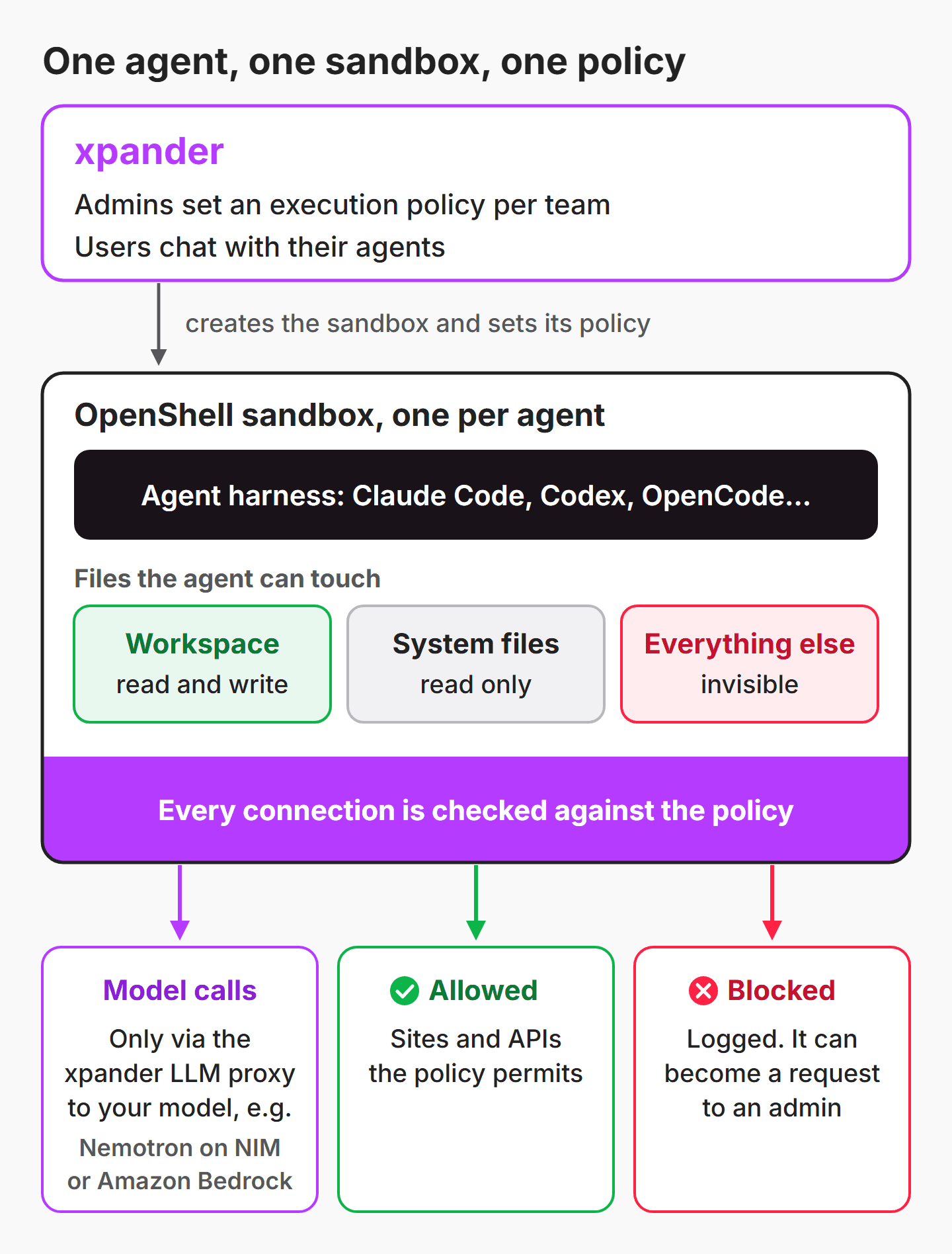
One execution policy per team
Each team gets an execution policy that sets what its agents may reach. Admins set it in a simple form that spells out what is allowed and what is blocked, and xpander applies it to every sandbox for that team. Users still shape their own agents, but only admins own the boundary.
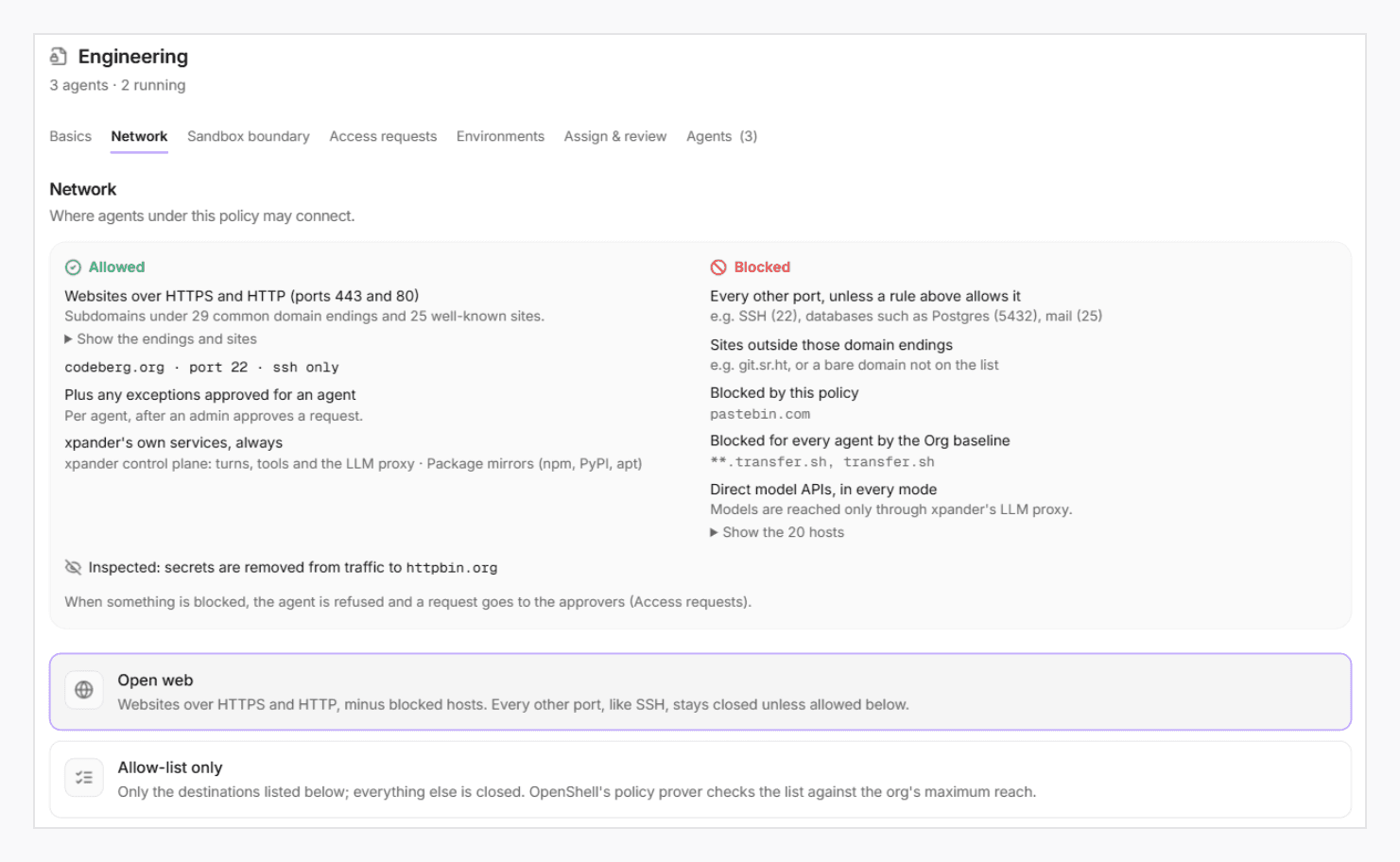
A block becomes an approval
When an agent needs something its policy doesn’t allow, the block doesn’t disappear into a log. It becomes an access request to an admin, never to the agent’s owner. One approval, and the agent carries on without a restart.

Here, an agent was blocked from three code hosts, and each request now waits for an admin.

One path to the model
Model calls leave the sandbox only through xpander’s AI Gateway, to your own model. The agent never holds a provider key, and budgets, model access and audit apply to every call.
Governance highlight: policy in plain language with Omni
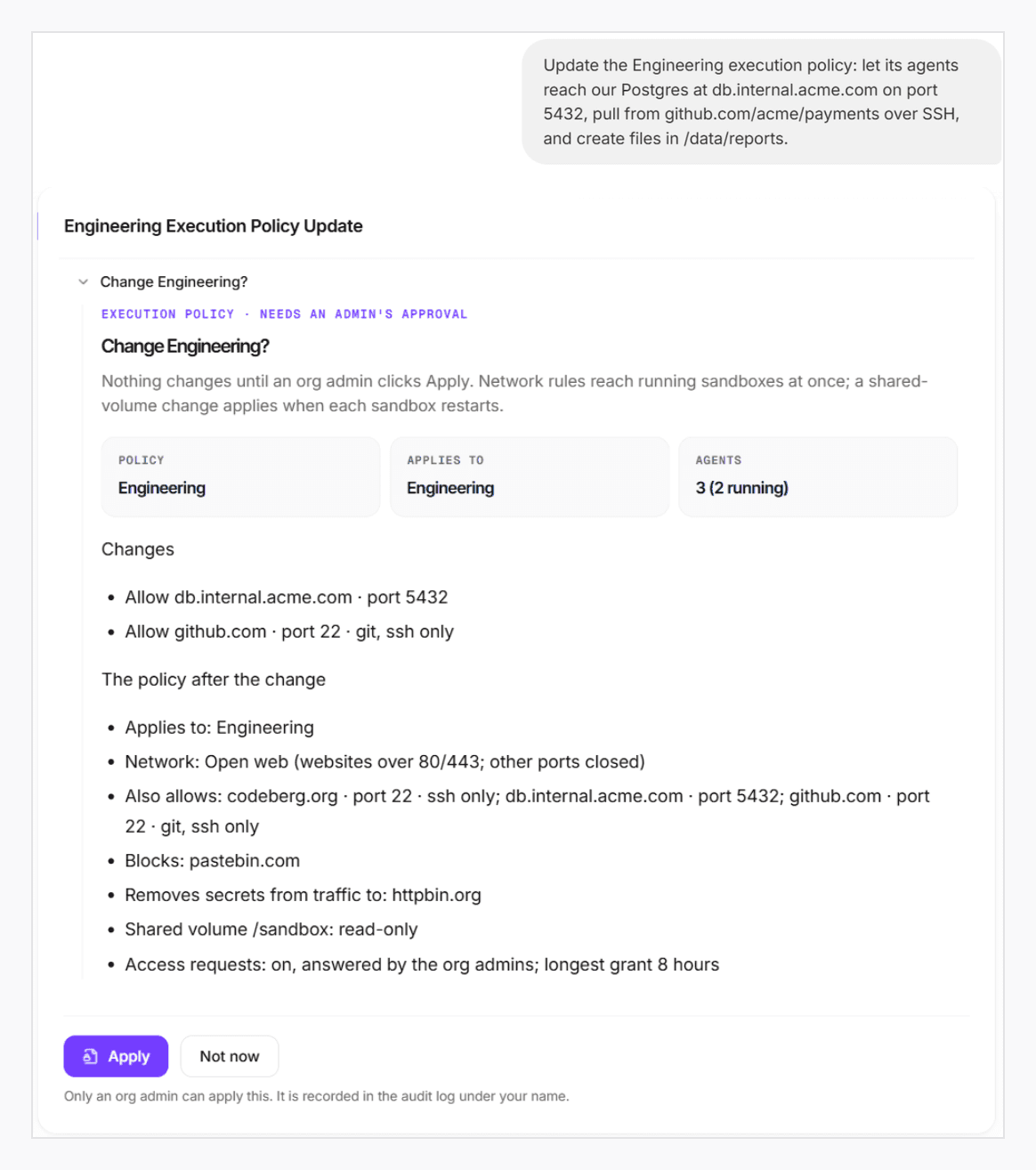
One highlight of xpander’s governance is Omni, its FDE agent. Admins say what a team’s agents may do, in plain language, and Omni drafts the policy change in seconds: what changes, how the policy will read, and how many agents it reaches. Nothing changes until an org admin clicks Apply, and every change lands in the audit log.
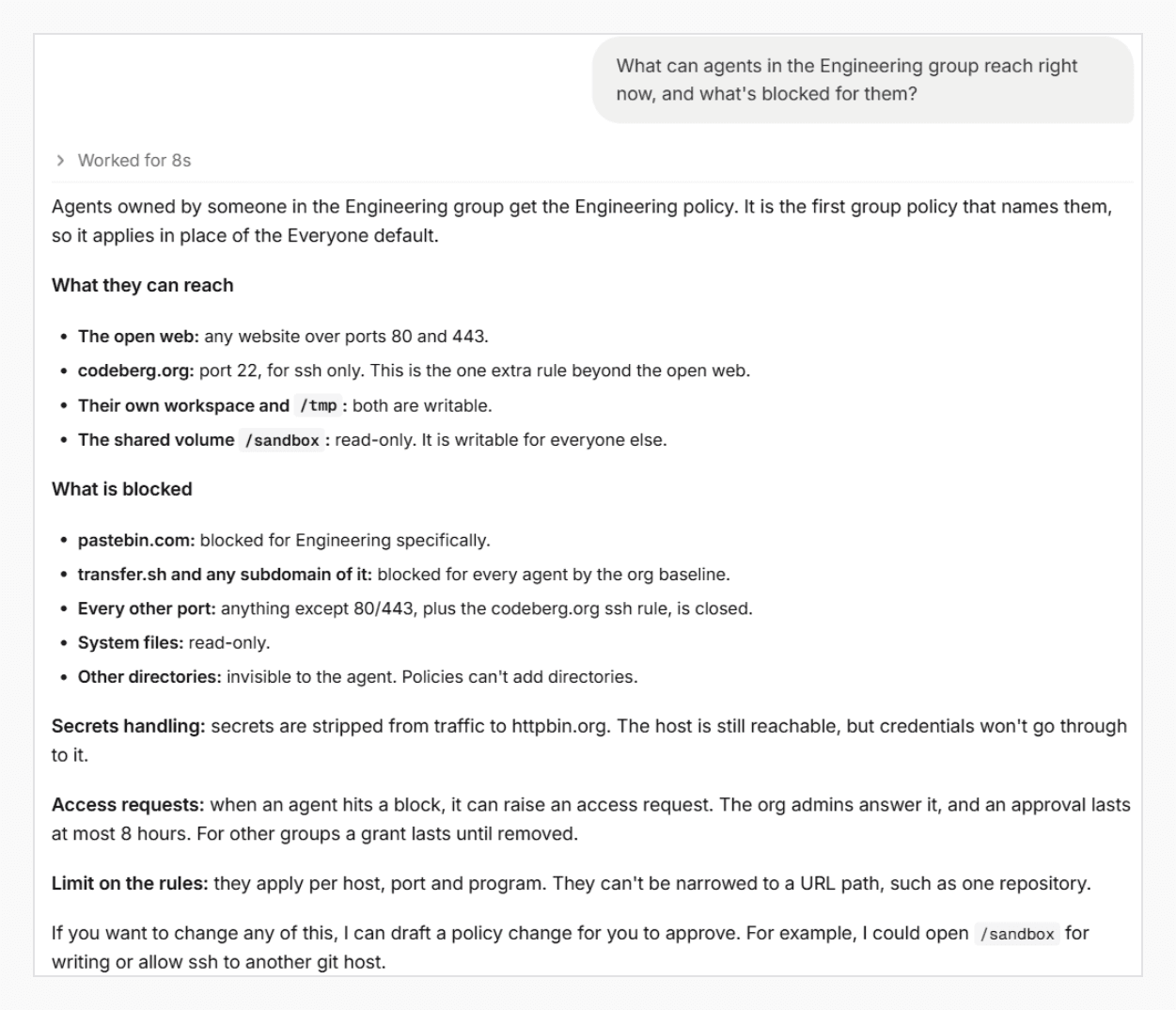
Admins can also simply ask what a team’s agents may do. Omni reads the live policy and answers in plain words.
What it looks like in practice
We measured this on our reference deployment, running Claude Code with models from Amazon Bedrock. Codex and OpenCode use the same path.
Policy changes in seconds. Omni drafts a change in about 10 to 15 seconds. Once an admin applies it, running agents pick up network changes immediately, with no restart.
A block becomes a request in about 2 seconds. Approved access goes live without restarting the agent.
A boundary that holds. Agents can’t write outside their own workspace, even where file permissions would allow it, and the rest of the system is invisible to them.
Everything on the record. Every block, access request and policy change is kept as an audit trail.
Why xpander and OpenShell fit together
OpenShell gives every agent a strong sandbox. xpander gives the company the agents themselves, and the governance around them:
Self-hosted next to your NVIDIA stack. Agents, policies and the audit trail stay in your environment.
Vendor-neutral. Any harness and any model, including NVIDIA Nemotron on NIM.
Governed company-wide. Policies per team, approvals, audit and budgets, with Omni to draft policy changes in plain language.
Looking ahead: NVIDIA Sentry
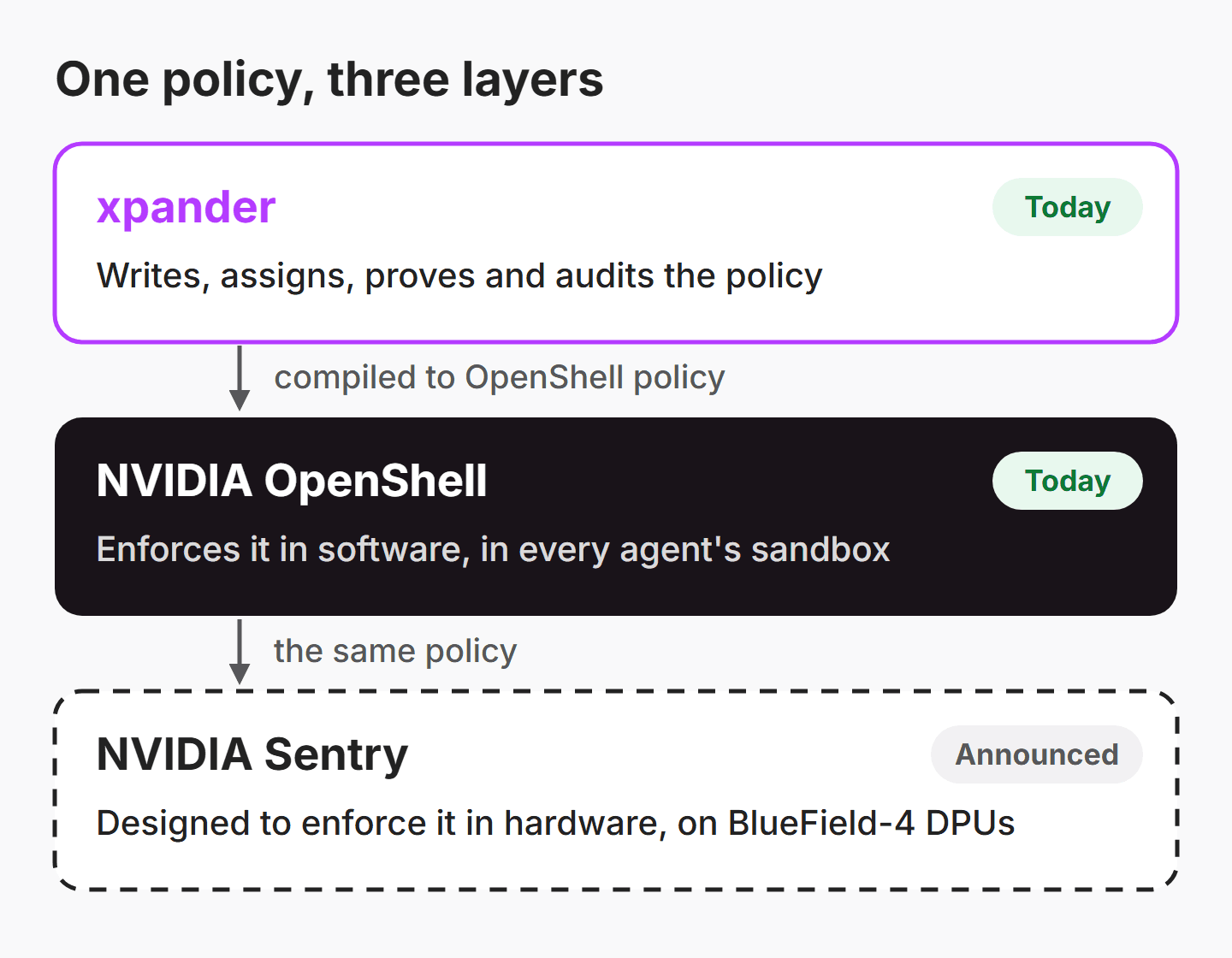
NVIDIA’s announcement also includes Sentry, a reference design for enforcing OpenShell policy in hardware, on BlueField-4 DPUs separate from the machine the agent runs on. NVIDIA says it can quarantine an agent that tries to move outside its boundary in milliseconds, and the announcement gives no availability date for it. Because xpander’s policies compile to OpenShell policy, they are the same policies Sentry is designed to enforce.
Book a demo to see xpander run your agents inside OpenShell sandboxes, under policies your security team sets and approves.


