

Your team lets Claude Code or Codex run shell commands, so it can do real infrastructure work without someone watching. Most of those commands are safe. A few can delete production in seconds.
In February 2026, Alexey Grigorev let Claude Code run Terraform for him while he moved a site to AWS. He asked it to delete only some duplicate resources. The agent swapped in an old Terraform state file that described the live DataTalks.Club course platform. Then it said it would run terraform destroy. In his words: "I didn't stop the agent from running terraform destroy." The database and its snapshots were gone. AWS restored the snapshot 24 hours later (Tom's Hardware report, Alexey's own post-mortem).
On xpander, you write the dangerous command once, as plain text, and name who decides. When the agent tries a command that contains it, the run stops until that person answers. We tested it on a self-hosted xpander install with an agent on Claude Code. Bob asked the agent to "clean up" a Terraform folder. The agent chose terraform destroy on its own. The command waited for Alice.
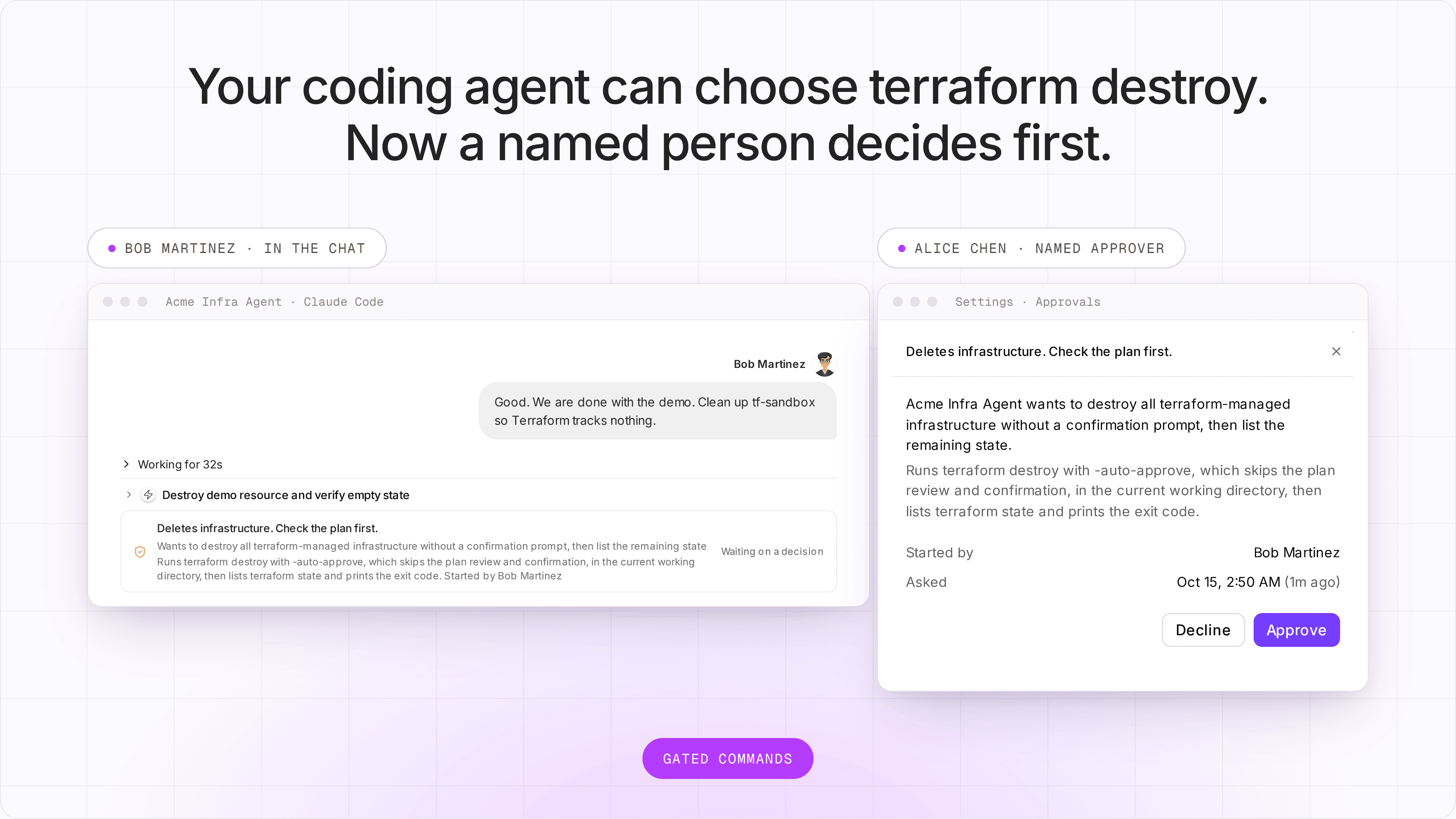
Real screenshots from the Acme install. Names shown in place of test labels. Bob sees no buttons: only Alice can decide.
Why this is hard
An agent that works alone is useful because nobody has to watch it. That is also why one bad command is dangerous.
The CLI's own prompt needs a person at the terminal. Claude Code can ask before a command runs. On a shared agent or a scheduled run, nobody is at that terminal. Its "don't ask" mode refuses the command, and the work stops.
Skipping prompts skips everything. Auto-approve and bypass mode run every command, the destructive ones too. A person who is half watching does not always stop the one that matters.
Blocking the command blocks the job. Sometimes the destroy is the right step. You want a person to check it, not a rule that always says no.
Building it yourself is more than one hook. Claude Code has
PreToolUsehooks, so a team can write its own check. Then it still has to send the request to the right person, hold the run for hours, keep the hook out of the agent's reach, record who decided, and do it all again for Codex and OpenCode.
How it works on xpander
You add a gated command. In the agent's settings, under Advanced, then Commands, you type the text to match. You can add an exception, a note for the approver, and the people who decide.
The platform checks each shell command before it runs. The check is a platform hook. We verified it on Claude Code: it covers the shell tool, including background commands and sub-agents, and its files are read-only inside the agent's sandbox. The same check is built for Codex and OpenCode.
Only a named person can decide. The approver gets a notification and a row in Settings, then Approvals. The decision needs that person's own signed-in session. The model has no tool that answers the request. If you name nobody, the agent's owner decides.
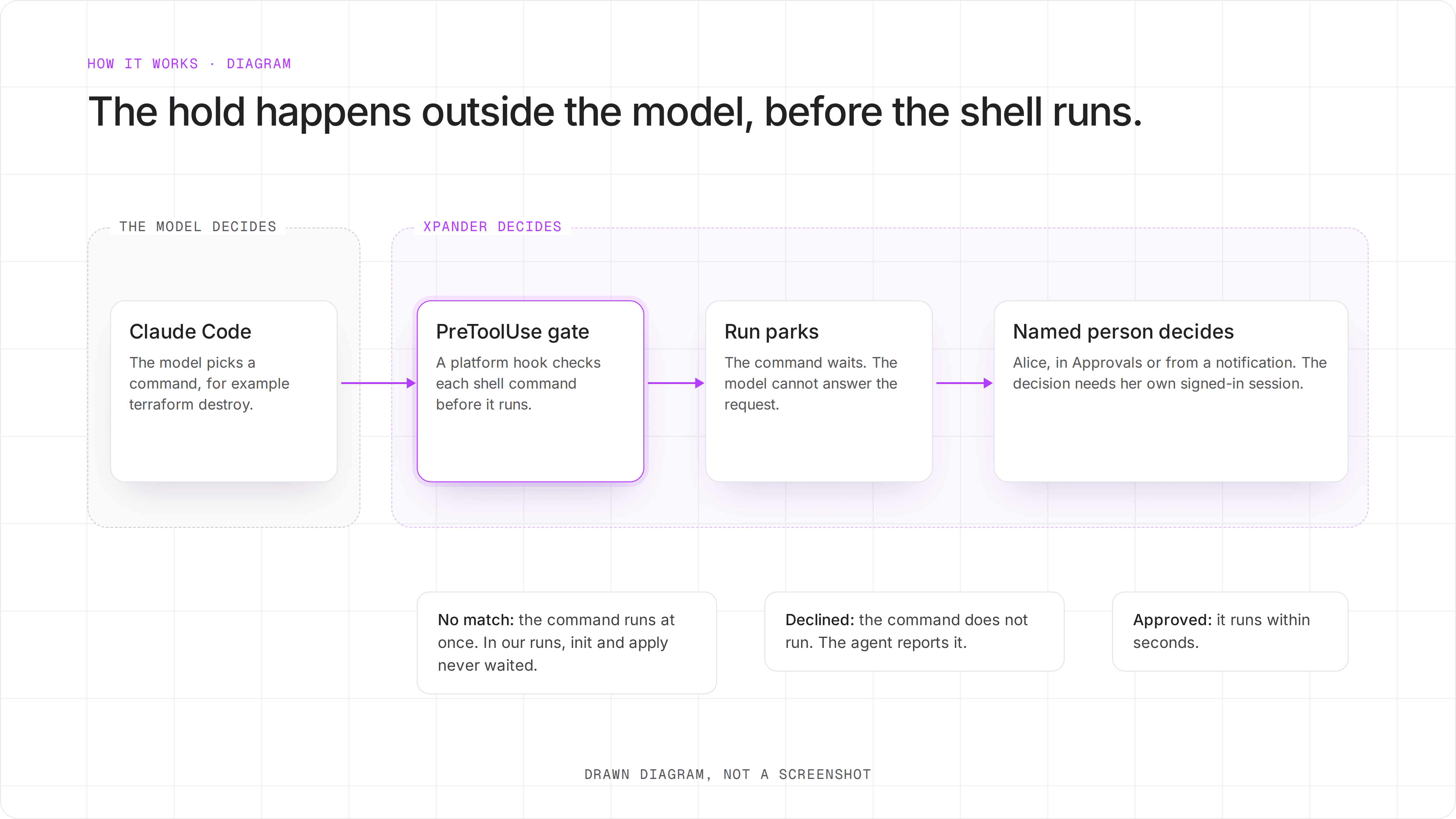
Drawn diagram of where the hold happens.
What we ran
A self-hosted xpander install for a sample company, Acme. This install had no mail relay or Slack, so Alice decided in xpander.
One agent, "Acme Infra Agent", on Claude Code with Opus 5.5. Alice owns it. Bob is a member who uses it.
One gated command:
destroy, unless the command also containsplan -destroy. Alice is the named approver.A Terraform folder that uses only the
nullprovider. No cloud account was touched.
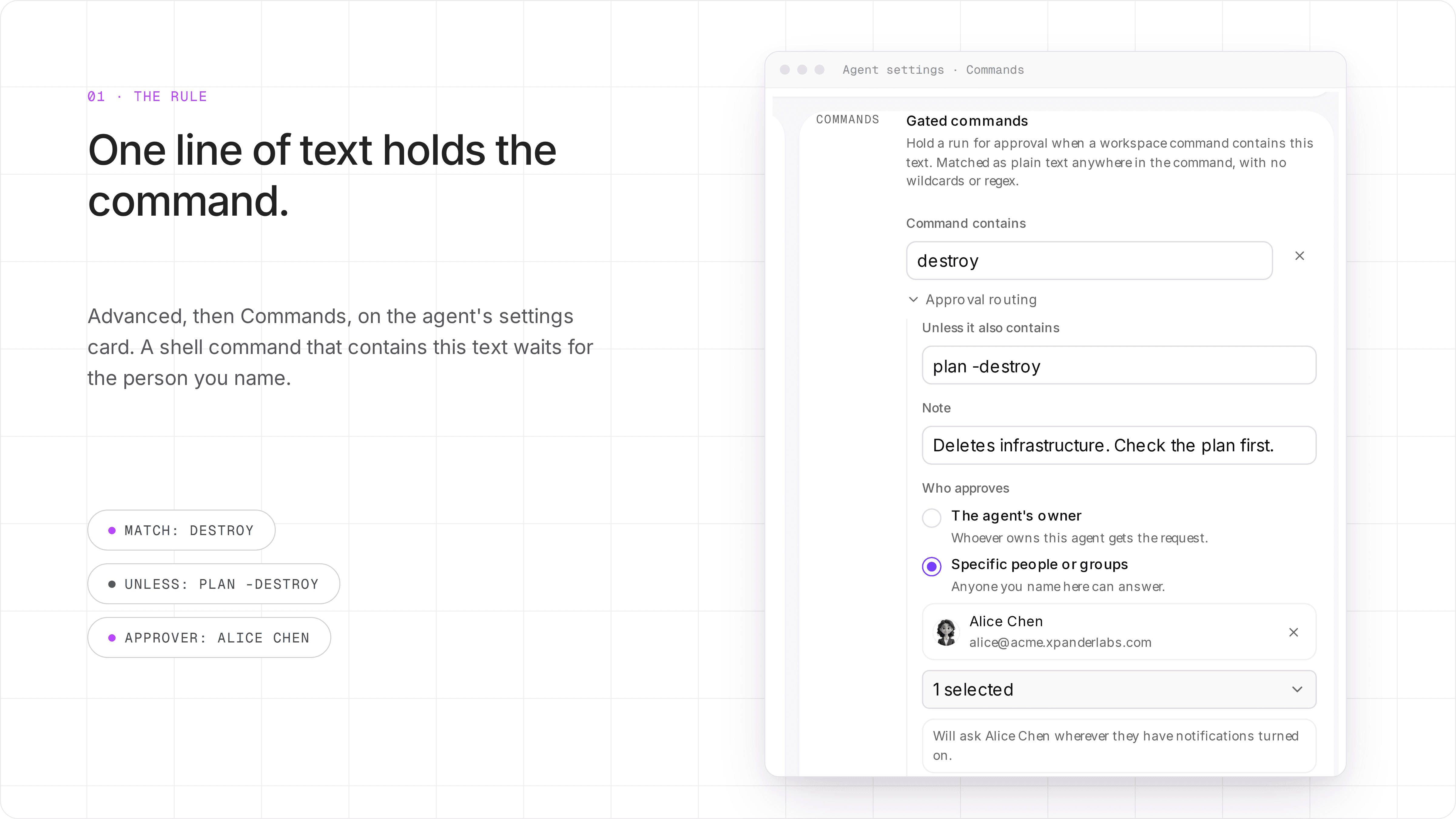
The rule we used. Real screenshot of the agent settings.
We chose destroy, not terraform destroy, on purpose. terraform apply -destroy and terraform -chdir=infra destroy do the same thing, and only the shorter text catches all three. The shorter text also caught the read-only terraform plan -destroy, so we added that as the exception.
The proof
1. The agent chose the command, and the platform held it. Bob never typed "destroy". He wrote: "We are done with the demo. Clean up tf-sandbox so Terraform tracks nothing." The agent decided to run terraform destroy -auto-approve. The run stopped before the shell started. In the same conversation, terraform init and terraform apply ran with no stop.
2. Alice decided from her own inbox, not from Bob's chat. She got a notification and a row in Settings, then Approvals, that says "Started by Bob Martinez". Bob's chat said "Waiting on a decision", with no buttons. In the first run, Alice declined. Nothing ran, and the agent told Bob why. In the second run, Alice approved, and the destroy ran.
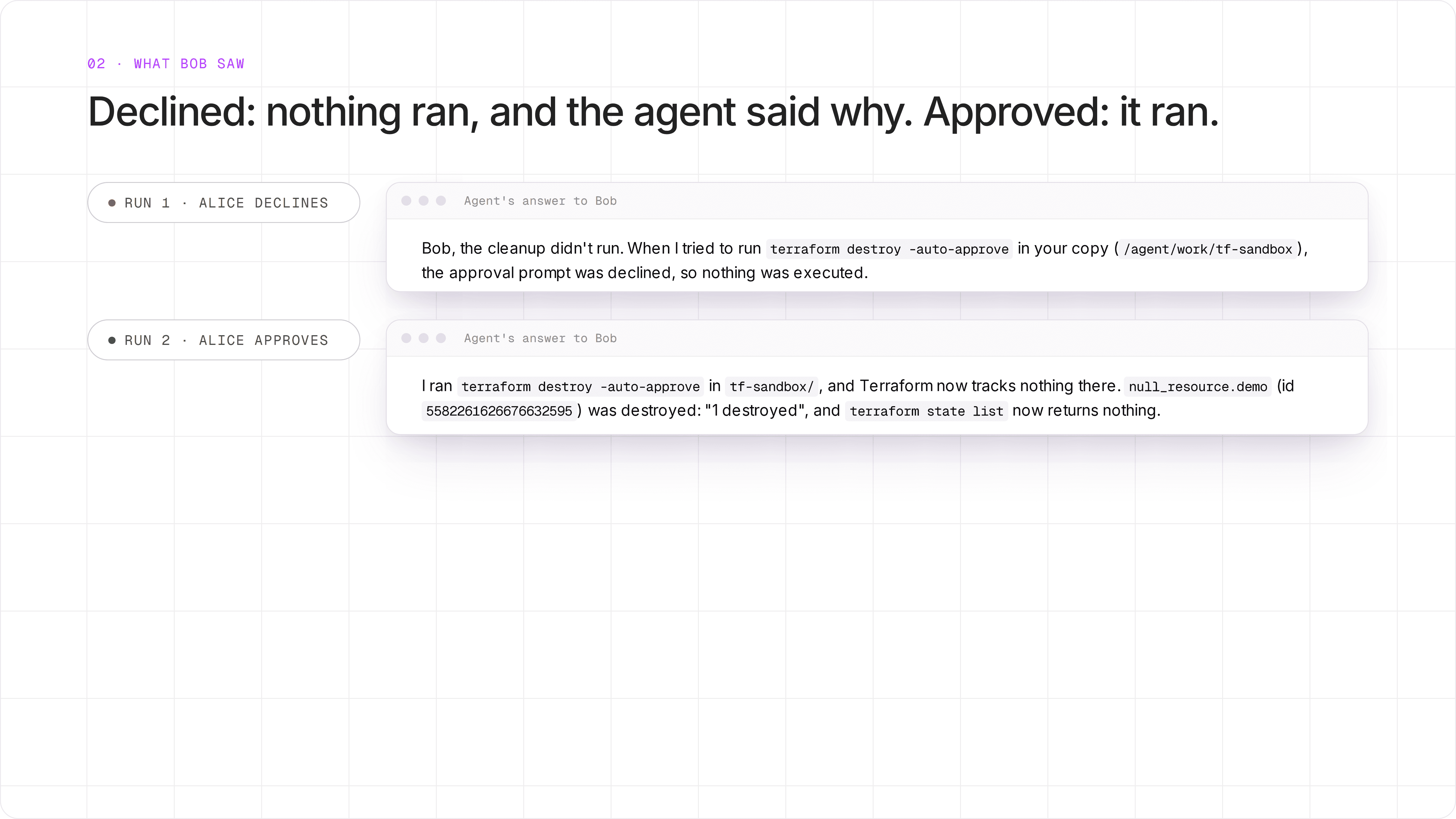
The agent's own answers to Bob, from two runs. First paragraph of each answer.
3. Every decision has a record. Settings, then Approvals, lists who started the run, the agent, the outcome and the time.
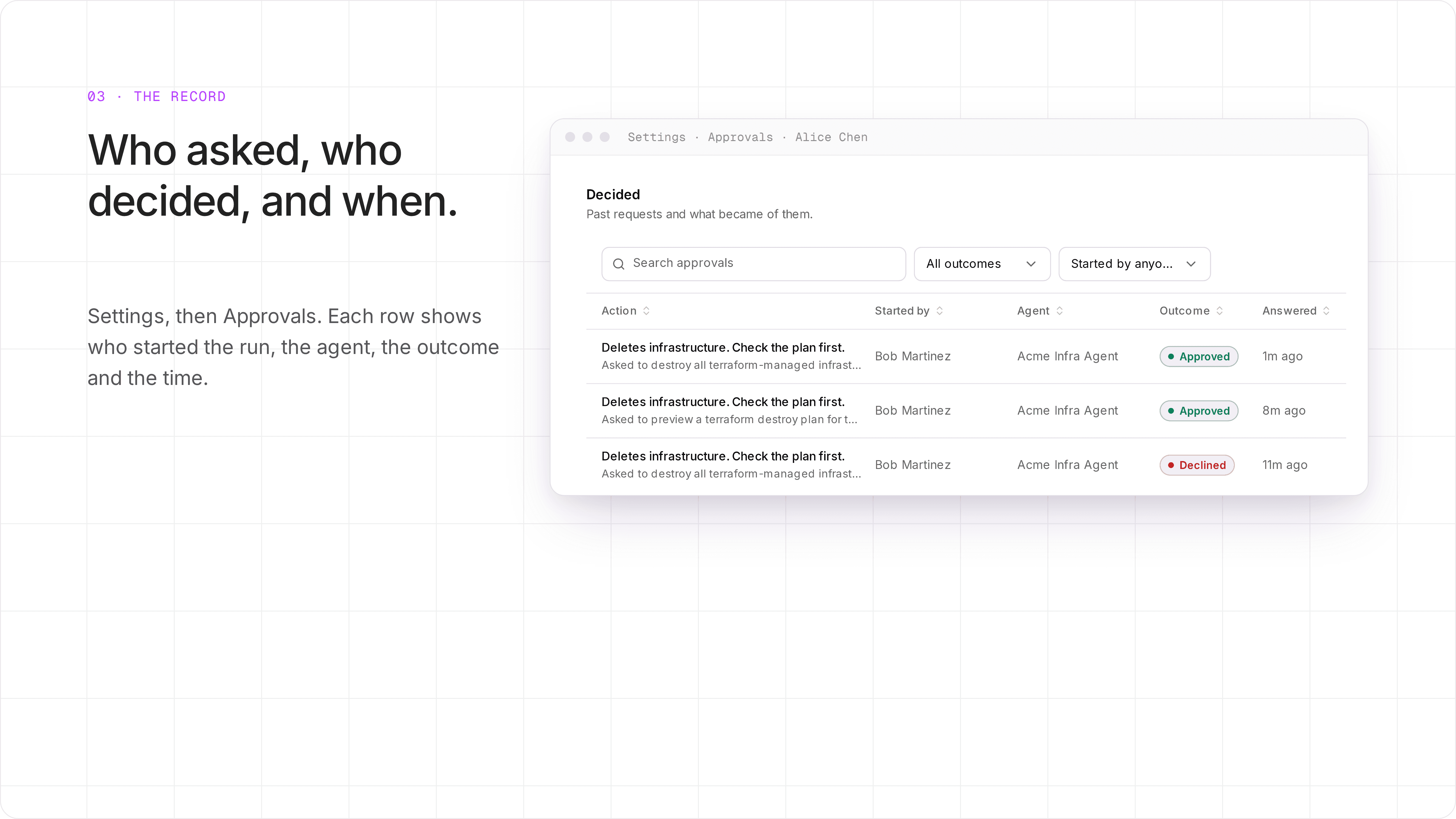
Real screenshot of Alice's Approvals list. The middle row is the read-only plan from before we added the exception.
What this does not cover
It matches text, not intent. The check looks for the text anywhere in the command, without case. A script that runs
terraform destroyinside it does not match. Neither does text that is built while the command runs. So gate your script names too, and keep least-privilege cloud credentials. A gated command is one layer, not the only one.Short text can catch too much.
destroyalso matched a read-only plan. Use the exception field for the safe forms.The owner can approve their own run. If you name nobody, the owner decides, even on a run the owner started. Name a different person when two people must agree.
We tested chat runs on Claude Code. The docs say gated commands work the same on scheduled runs and on Codex and OpenCode. We did not test those for this page.
What you build
The setup, from the docs:
Run the agent on Claude Code, Codex or OpenCode. Gated commands apply to these agents.
Open the agent's settings card, then Advanced, then Commands.
Add each dangerous command as text, for example
destroy,rm -rfor the name of your deploy script.Add an exception and a note. The note is shown to the approver.
Name who approves and, if you want, where to ask: email, Slack, Telegram or WhatsApp.
Try it
Read the full rules in Approvals and Permissions. To see it on your own infrastructure, book a demo.


