

Someone on your team built a useful Claude Code agent. It has a prompt, a script, a secret it needs, and a job it should do on a schedule. Claude Code can share the definition: you can commit the subagent file to the repo, or ship it in a plugin. But every copy still runs on one person's laptop, with that person's credentials. Nothing runs it on a schedule while the laptop is closed. And there is no shared record of who ran it.
On xpander, you paste the agent into a chat with Omni. Omni deploys it with its script and its schedule. It asks for the secret through a secure link, so the value never passes through the chat. We tested it on a self-hosted xpander install. Alice imported a drift-check agent. Fifteen minutes later it ran on its own, with the secret she had entered through the link. Then Bob used the same agent from his own chat.

Real screenshots from the Acme install. The left side is the definition we imported.
Why this is hard
Sharing the file is not sharing the agent. A committed or plugin subagent runs wherever someone starts Claude Code, with whatever credentials that person has.
Nothing runs it while you are away, unless you build CI for it. A subagent runs when someone starts it. The Claude Code GitHub Action can run a prompt on a cron schedule, with secrets stored in GitHub. But its results go to the workflow run log, and each repository needs its own workflow file. Teammates can mention @claude in an issue, but that is a separate workflow in each repository. Nobody can talk to the scheduled agent itself, and there is no chat where its runs and answers are kept together.
Secrets end up in the wrong places. To move an agent somewhere else, someone has to paste a token into a config file, a CI variable or a chat.
No shared record. Claude Code keeps each session's transcript on the laptop where it ran. Nobody else sees what the agent did.
How it works on xpander
Paste the agent to Omni. A subagent
.mdworks, or a manifest that also carries files, schedules and secret names. The same manifest works from a script or CI.Omni deploys it and reports each part. The prompt becomes the agent's instructions. Files go into the agent's workspace, and schedules are created. Built-in tools such as Bash and Read are covered by the workspace. Anything it cannot map is named in the report.
Secrets come in through a link. Only the secret's name travels with the import. Omni sends a single-use link, and you type the value in the browser. It goes straight to the agent's workspace.
It runs for the team. Scheduled runs need no laptop. Teammates open the agent in Xpander Chat, and each conversation shows who started it.
What we ran
A self-hosted xpander install for a sample company, Acme.
An agent called drift-checker: a 3-rule prompt, a script (
scripts/drift.sh) that stops with an error unlessDRIFT_REPORT_TOKENis set, and a schedule every 15 minutes.Alice imported it through Omni and entered the secret through the link. We used a random test value, not a real token.
A Terraform folder that uses only the
nullprovider. No cloud account was touched.
The proof
1. The import carried the script and the schedule. Omni answered in 28 seconds. It reported the agent as deployed, with scripts/drift.sh in its workspace, the schedule "Drift check every 15 minutes", and Bash and Read covered. It also said what was missing: the secret had no value yet.
2. The secret went through a link, and the scheduled run had it. Alice opened the single-use link and saved the value. At 04:01 UTC the schedule fired with nobody at a laptop. In the run log, the script printed "token present (29 chars)", which is the length of the test value. Without the secret, the script stops with exit code 3 before it does anything.

Real screenshots. The run log shows the length of the value, never the value.
3. It kept running on its own. The schedule fired again at 04:16 and 04:33 UTC. Each run used the same stored secret.
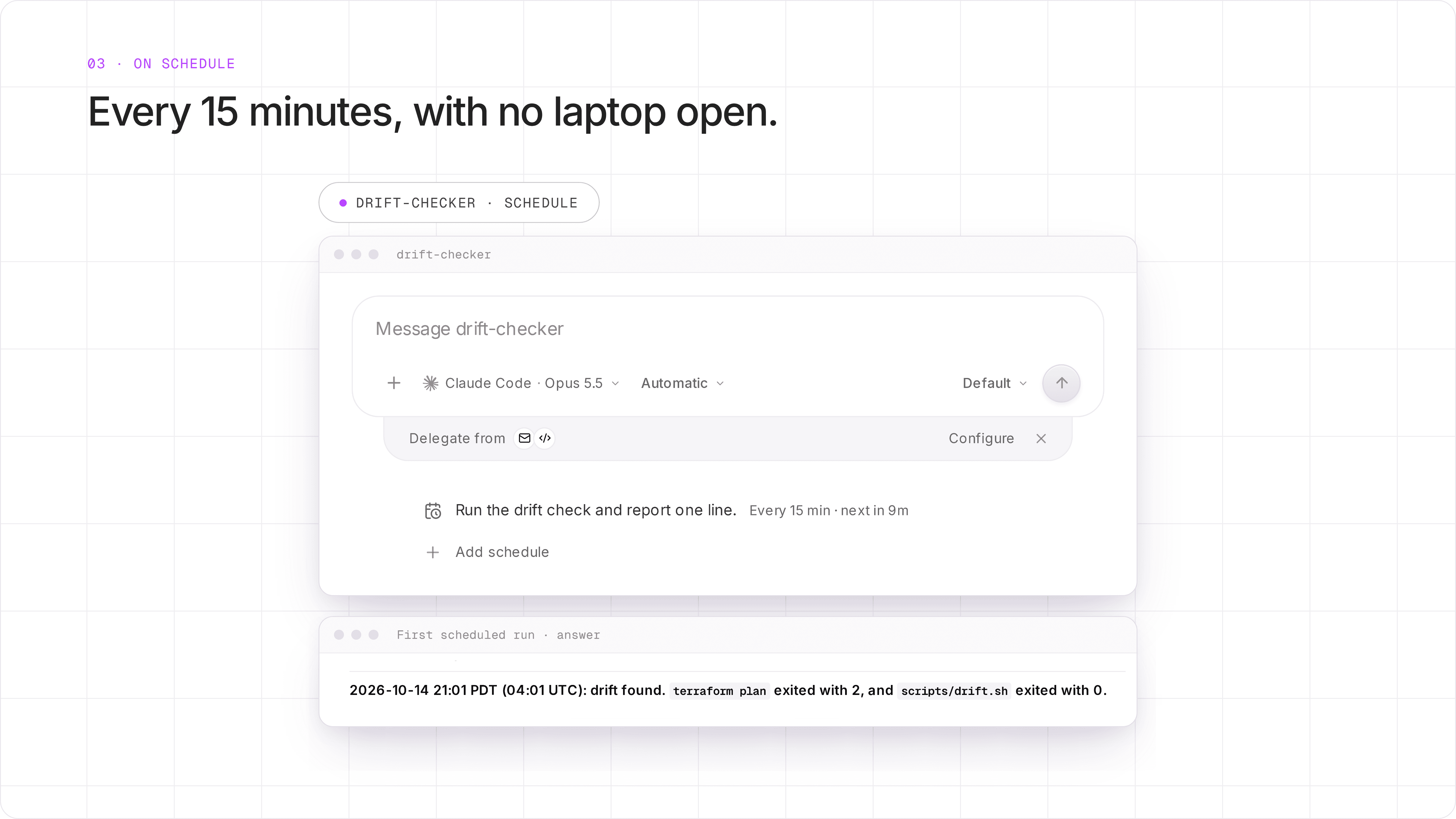
Real screenshots. The agent reported "drift found" because the test folder has no saved state. That is a property of our test script, not of the import.
4. A teammate used the same agent. Bob opened drift-checker in his own chat and asked for a check. The agent ran the same script with the secret Alice had saved. The script stops with exit code 3 when the token is missing, and Bob's run returned 2, so his run had the secret. Bob installed nothing and never saw the value. In All conversations, Bob's run shows his name, and the scheduled runs show no person.
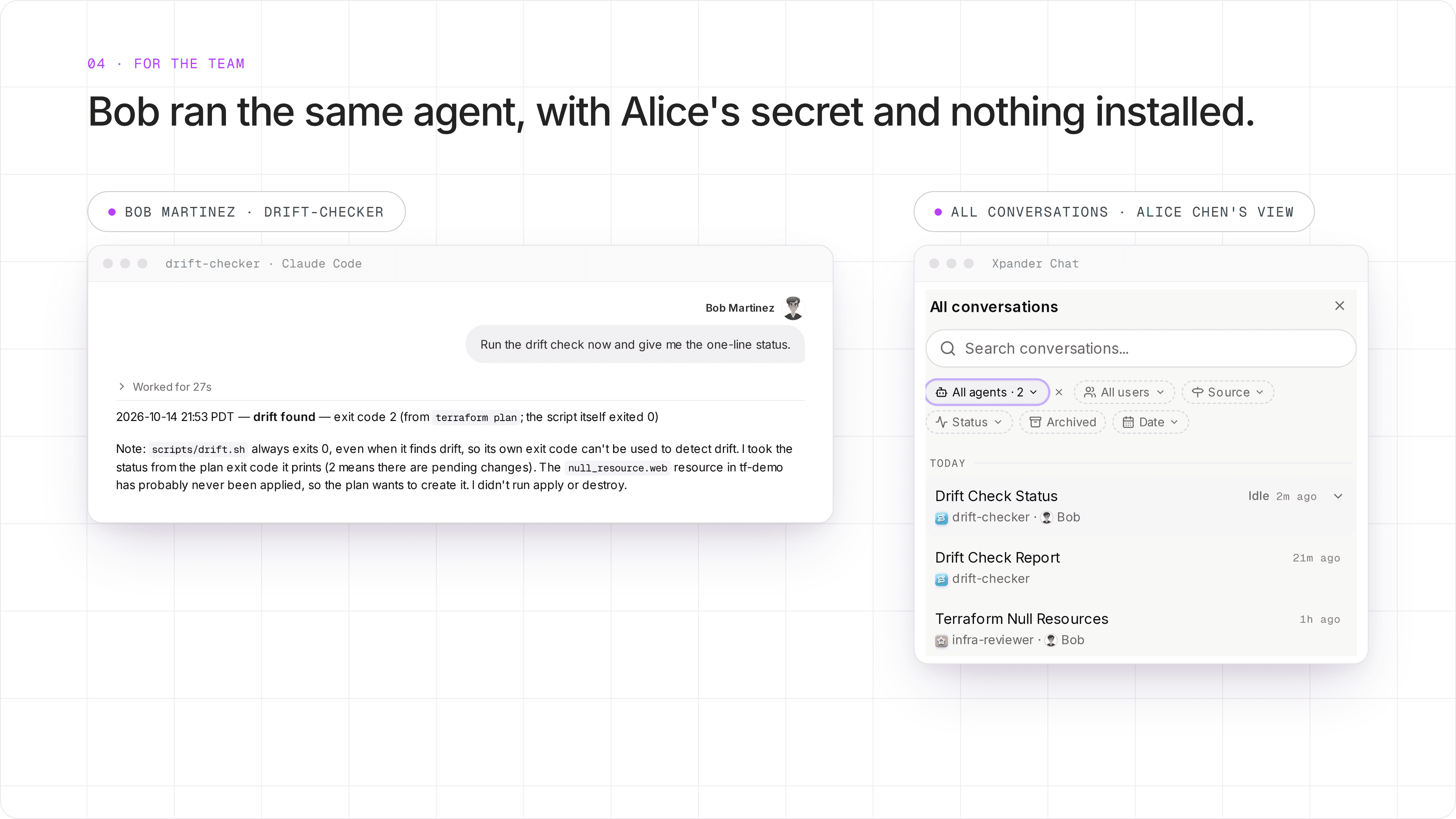
Real screenshots from Bob's chat and Alice's conversation list. The note about exit codes is about our test script, not about xpander.
What this does not cover
The secure link pointed to the wrong host on our install. Omni gave the link on xpander's cloud address, because of a bug in our install chart. The cloud page asks for a cloud sign-in, so a self-hosted user cannot save a value there. On a self-hosted install, open the same path on your own xpander address. We reported this as a bug.
The model can change on the first run. On installs that reach Claude only through Amazon Bedrock, the first run moved the agent to the install's default model. That happened on ours. This is a known bug, and we reported it. Check the model after the first run and set it again if needed.
Workspace secrets belong to the agent. Everyone who can use the agent runs with them. That is right for a shared drift check. For per-person access to a system, use per-person sign-in instead.
Sharing depends on your settings. On our install the imported agents were Org-wide. On yours, check Manage access.
The full record has limits. The conversation list shows who started each conversation. The audit log records a person only for actions that needed an approval.
Some tools do not map. A tool with no xpander equivalent is named in the report, and you connect a skill or an MCP server for it.
What you build
The setup, from the docs:
Open a chat with Omni in Xpander Chat, or connect Claude Code to Omni's MCP endpoint.
Paste the agent, as a subagent file or as a manifest with files, schedules and secret names.
Open the secure link and enter each secret value. In CI, use
POST /v1/agents/{agent_id}/workspace/secrets.Read the report. Connect any tool it names, and check the model and access.
Keep the definition in version control. Importing the same name again updates the agent in place.
Try it
Read the full flow in Importing agents. To see it with your own agents, book a demo.


