
Your company pays for Anthropic, OpenAI and Amazon Bedrock, and maybe runs its own models on vLLM. Claude Code, Codex, internal apps and agents all call them. The invoice shows tokens per key. Finance asks who spent the budget. Security asks who sent a client file to which model. You cannot answer either, because most calls share a few keys.
You are not the only one asking. The FinOps Foundation's State of FinOps 2026 survey found: "Almost all the 1,192 survey respondents (98%) are managing AI spend, it has become the norm, up from 31% just two years ago."
Why shared keys hide the answer
A provider sees the key, not the person behind it. One key in a team's coding setup can carry the work of every engineer on the team. One key in an agent platform can carry every run of every agent. The provider's usage page is accurate. It still cannot tell you who did what.
The common fix is a gateway. Anthropic's Claude Code docs describe it: "A gateway is a proxy your organization runs between Claude Code and a model provider." And: "Developers authenticate to the gateway rather than holding provider credentials, so authentication, usage tracking, budgets, and audit logging happen in one place you control."
A gateway records only the calls that pass through it. So the work has two parts: give every caller its own identity, and close the paths around the gateway.
What one call record must answer
Who: the person, and their group.
What started it: a coding tool, an app, or an agent run, and which one.
What it used: the model, the provider, and which key paid.
What it cost: input, output and cache tokens, and an estimated price.
What happened: success, refusal, or error.
Where it goes: your security log system (SIEM) or data lake, not only a vendor dashboard.
The options you have today
Option | Where it wins | What it costs you |
|---|---|---|
Each provider's own console | Free and exact for that provider. Seat plans, such as Claude Enterprise, report per person. | One view per vendor. Outside Claude Code, API usage is by key, not by person. Agents and apps hide behind shared keys. |
A vendor's own gateway, such as Anthropic's Claude apps gateway | Ships with Claude Code. SSO sign-in, model access by identity-provider group, usage metrics over OpenTelemetry. | It covers Claude Code. Codex, OpenCode, your apps and your agents need another path. Anthropic's docs add: "there is no service-token flow, so a CI pipeline with no developer to approve the sign-in can't authenticate through it." |
A general LLM gateway, such as LiteLLM, Portkey or Kong | Many providers behind one address. Per-user and per-team keys, budgets, routing and log export. | It sees a key and a user. Tying each call to the agent run and task that made it, and setting up each coding tool under the person's own identity, is work you add. |
An agent platform with the gateway built in | The person, the agent run and the budget come with every call. | Fits best when your agents run on that platform. If you already run a gateway, check that the two can connect. |
The xpander AI Gateway is built on LiteLLM. What xpander adds is the identity of each call: the person, the agent run and the task, with budgets that stack across them.
If your company only uses Claude Code, Anthropic's gateway may be all you need. Once several coding tools, apps and agents share the bill, the record has to cover all of them.
How it works in xpander
Agents, apps and coding tools call the xpander AI Gateway with an xpander key instead of a provider key. The gateway identifies the caller, checks the model and the budget, picks the key that pays, and writes one record per call. Every model call an agent's harness makes goes through the gateway, on xpander cloud and from Hybrid chart 0.22.5 and Air-Gapped chart 0.17.2.

Diagram. Every caller uses an xpander key. The gateway checks, then records. On Hybrid, agents use the gateway in your cluster and coding tools use xpander cloud.
Connect your providers. In the Platform, open AI governance > Models, choose Add provider and add a key. Your own OpenAI-compatible endpoints, such as vLLM, connect the same way. Set a price per 1M tokens with Edit model, or their spend reads zero.
Turn on models per group. Tick the models people may use, and limit a model to some groups.
Set budgets. Budgets apply per organization, group, member, API key, agent, turn, or end user of your own app (by the
userfield the app sends). A new budget only notifies. Choose Block for a hard stop. Agent, turn and member budgets block only when Enforce agent, turn and member budgets is on.Give every caller an identity. In xpander Chat, each person opens Settings > AI models & keys and copies a setup command for Claude Code, Codex or OpenCode. It uses their personal xpander key. An organization API key records calls under the key. For an app with its own users, have it send the OpenAI
userfield. The gateway stores it with each request.

Usage, grouped by person: who spent what, per day.
Watch the "Not tied to a person" row. It holds calls made with an organization API key, and agent runs started by a webhook, the API or a schedule with no person named. It is the number to drive toward zero: give each app its owner's personal key (calls then run on that person's models and budgets), and set input.user when you start a run from the API.
Close the paths around the gateway. xpander gives agents no provider key, but their workspaces can reach the internet. So keep provider keys only in xpander, never as secrets an agent can read. On laptops, push a Claude Code managed settings file from your device management tool that sets the gateway address and
allowedProvidersto["customEndpoint"](Claude Code v2.1.285 or later). Claude Code then refuses a session pointed anywhere else (Anthropic docs). Codex and OpenCode setups write the person's own config file, which they can edit. Allow outbound calls to provider APIs only from the gateway. A sealed Air-Gapped install already blocks them.Send the records to your systems. In Logs, add a log destination: Parquet files in Amazon S3, Google Cloud Storage or Azure Blob Storage, or spans to your OpenTelemetry collector over HTTP. A destination starts from the moment you save it. Records are kept 90 days by default, and you can set up to 1 year on xpander cloud. If you must keep them longer, the export is your copy.
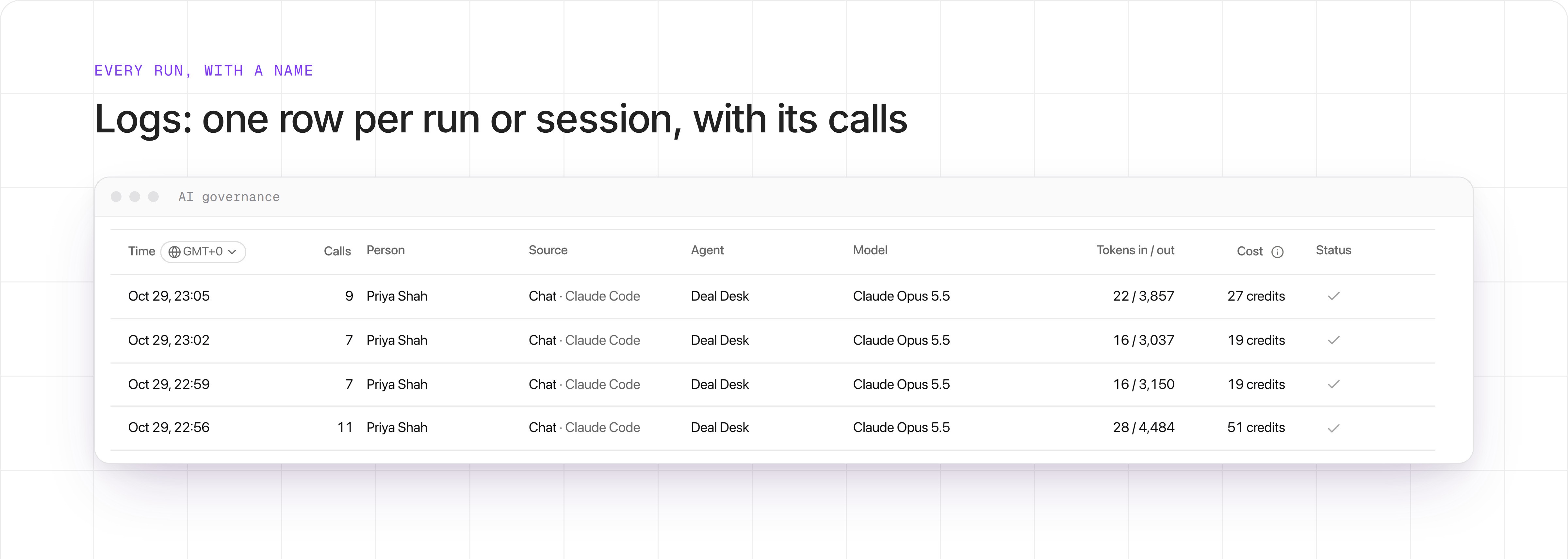
Logs: each row is one run or session, with the person, what started it, the model, the calls and the cost.
Token counts in the list are new input and output. Cached tokens show in the request detail. Cache reads cost less than new input. On Anthropic models, cache writes cost more.
Each exported row answers the first five questions. The destination answers the sixth.
Question | Columns |
|---|---|
Who |
|
What started it |
|
What it used |
|
What it cost |
|
What happened |
|
In your data lake, group rows by user_id and client to get each person's spend per tool. Exports carry xpander member IDs, never email addresses, and xpander has no lookup for those IDs yet. The app's own user field stays in the request record. It is not in the export today.
Costs are estimates from token counts and xpander's model prices. For calls on your own key, your provider's invoice stays exact. On xpander cloud, where your model policy allows it, a person's own Claude Pro or Max plan can pay for their calls. Those calls are not billed to you and count toward no budget.
Prompt and response text. It is saved by default, encrypted with a key unique to your organization, so you can review a call. Keys, headers, images and files are never kept, and anything that looks like a secret is removed. Only roles that may view usage can open it, and each opened request is logged. It never appears in exports. Saved text can include personal data, so check your privacy obligations. An admin can turn it off for the whole account or for one group.
Already run a gateway? xpander connects to it in either direction: your gateway in front of xpander, or xpander in front of your gateway. On Air-Gapped, the gateway, keys, records and saved text all stay in your install.
What this does not cover
Calls that skip the gateway are not recorded. Only Claude Code can be locked to the gateway on a laptop today. Step 5 closes the other paths.
On Hybrid, agents use the gateway in your cluster, but people's coding tools connect to xpander cloud. Their records live there, and their text is never kept.
Exports carry xpander member IDs with no lookup yet, and not your app's end users.
Checklist for your model-call record
Every call names a person, an app user or an agent run.
Coding tools, apps and agents go through the same record.
Provider keys live only in the gateway, and other outbound paths are closed.
Budgets set to Block stop a call before it reaches the provider.
Records reach your own storage or SIEM, and you keep them as long as you must.
You decide, per group, whether prompt text is kept.
AI Gateway docs (the docs still call it the LLM Gateway) · Book a technical demo


