In software development, large or complex pull requests slow teams down, hampering the productivity of developers and their focus on the key tasks. It doesn't stop here; reviewing multiple commits is time-consuming, making it difficult for engineers to fully dedicate themselves to their projects. The solution for this is the PR Review agent. Automating code reviews can speed up delivery and enforce quality for development. A PR review agent can do the in-depth analysis, creating summaries, flagging issues, and identifying safe changes to merge.
In this tutorial, we will tell you how to build a GitHub PR review agent with xpander.ai and Agno Framework that gets the GitHub PR information, does the scoring and comments on code changes. It will also notify teams on Slack and optionally auto-merge approved PRs.
Let’s Begin.
What Are We Building?
In this tutorial, we are working on:
How to build a GitHub PR Review Agent.
How to automate the review workflows with summary generation, scoring and more.
And also integrate it with Slack for seamless team collaboration.
So, without any further ado, let's talk about the role of xpander.ai in the PR review agent and after we will go to the development part!
What is the Role of xpander.ai in PR Review Agent?
xpander.ai functions as the execution engine, infrastructure layer, and system interface that connects various components of the Agno-powered agent workflow. It also acts as Agno’s deployment layer through tight integration points such as the AgnoAdapter and xpander_handler.py. It efficiently coordinates review tasks from the moment they’re initiated.
Whether requests originate from a web interface, Slack, or an external API, they’re captured by the XpanderEventListener and passed to the PRReviewOrchestrator.
The orchestrator runs the review_pr tool with Qwen/Qwen3-235B-A22B to generate the code change summaries. Also, xpander handles memory management, maintains task state, and tracks metrics, ensuring consistent, reliable execution.
Configuration is handled via a single xpander_config.json file, which defines model behaviours, credentials, and other runtime settings. This makes it straightforward to deploy, extend, or adapt the agent’s capabilities to different environments.
xpander’s supporting SDKs, xpander_utils and xpander_sdk offer features such as task initialisation, tool orchestration, user session management, and automated logging.
For better understanding, we will take you through all the code files used in the development.
Check out more about xpander here: xpander.ai Docs
Pre-requisites
Before proceeding, please ensure the following requirements are met:
Python 3.10+ is required as the project relies on this version or higher.
xpander SDK to handle backend orchestration and multi-agent execution.
API Keys:
Slack Bot Token: This will help in sending PR summaries and decisions.
Nebius AI Studio: It provides inference endpoints for multiple LLMs
GitHub App Token: PR data access.
xpander.ai Credentials to configure the xpander_config.json File
This is the format to save the file under the name “xpander_config.json”:
{
"organization_id": "<YOUR_ORG_ID>",
"api_key": "<YOUR_XPANDER_API_KEY>",
"agent_id": "<YOUR_AGENT_ID>"
}
{
"organization_id": "<YOUR_ORG_ID>",
"api_key": "<YOUR_XPANDER_API_KEY>",
"agent_id": "<YOUR_AGENT_ID>"
}{
"organization_id": "<YOUR_ORG_ID>",
"api_key": "<YOUR_XPANDER_API_KEY>",
"agent_id": "<YOUR_AGENT_ID>"
}To get the credentials, follow these steps:
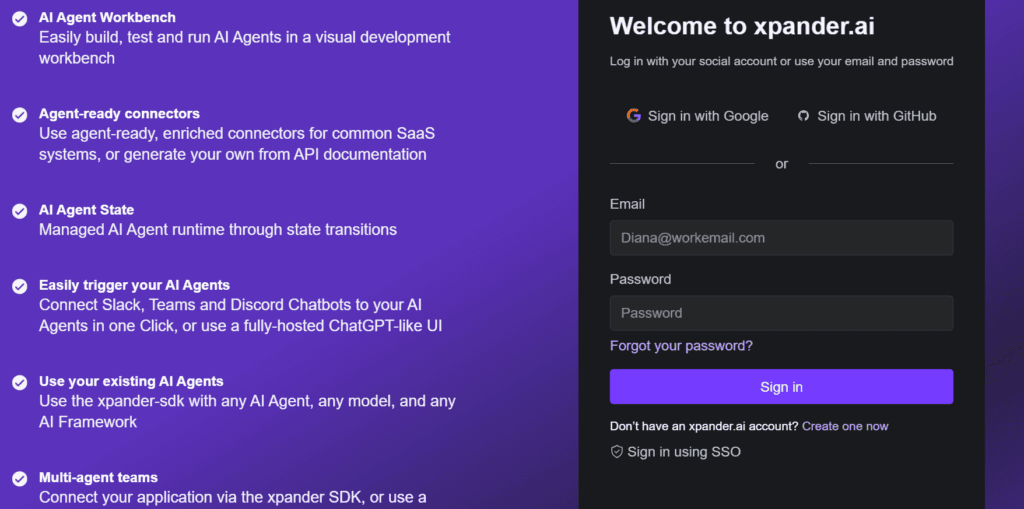
1. First, log in to your xpander.ai account and head to your dashboard:
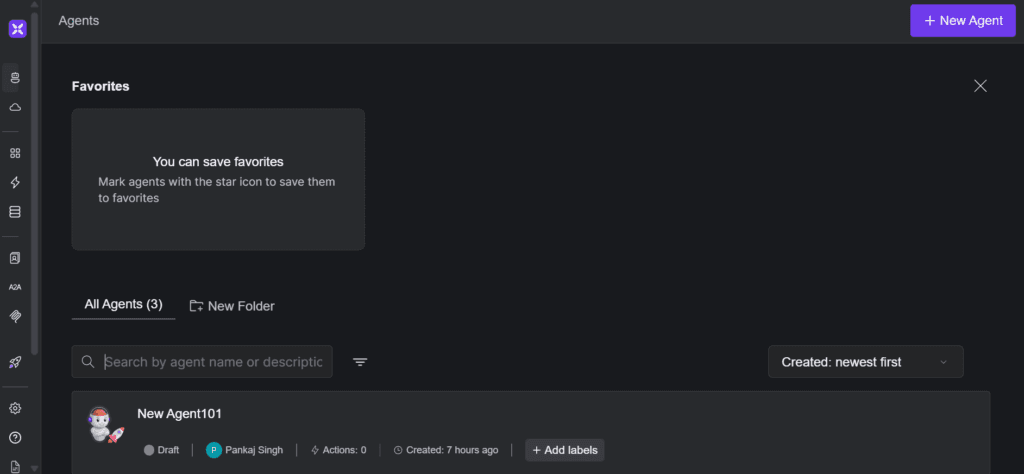
2. Then, click on "Create New Agent" to begin setting one up.
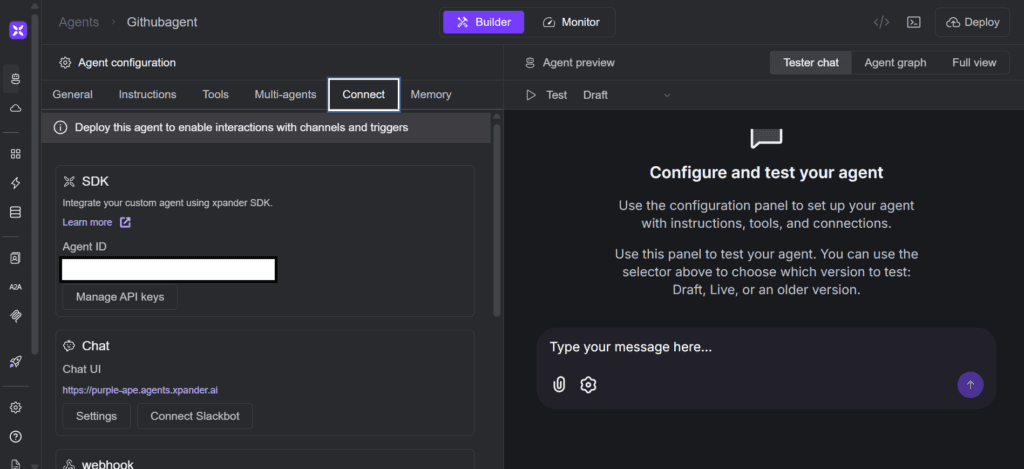
3. Once the agent is created, open the "Connect" tab. You'll find your Agent ID in the "SDK" section there.
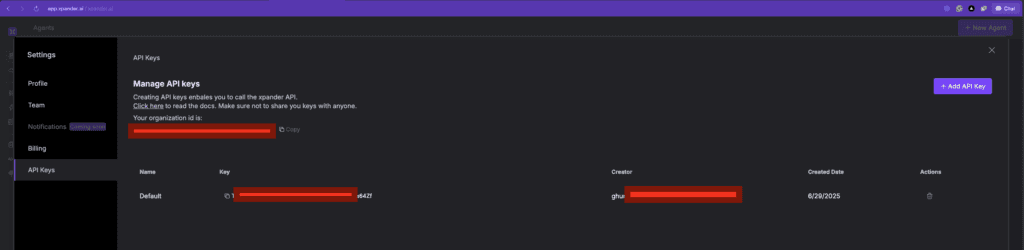
4. To get your Organisation ID and API Key, just click the settings icon and check the API key section.
Keep all the API keys safe!
Now, follow the steps for installation and working with the Agent:
How to Build a GitHub PR Review Agent?
Let’s build the PR Review agent, but first, set up the work environment:
Work Environment Setup
We will start by cloning the repository, and for that, get the Repo URL for the project.
Open your terminal and write this command:
git clone https://github.com/xpander-ai/xpander.ai.git
cd
git clone https://github.com/xpander-ai/xpander.ai.git
cd
git clone https://github.com/xpander-ai/xpander.ai.git
cd
Now, we will create a virtual environment.
Note: If you are not a Windows User, skip this part and check the macOS steps.
But before doing that, we will download WSL(Windows Subsystem for Linux).
Windows User
To install and use WSL in Windows, we start by installing WSL (if not already)
xpander_utils is not supported natively by Windows, so you will need to use WSL for proper support.
Open PowerShell as Administrator and run:
This will install Ubuntu by default, and after installation, restart your PC when prompted.
VS Code + WSL Extension
Now, open VS Code and install the "WSL" extension. To install it, press Ctrl+Shift+X → search for WSL → Install.
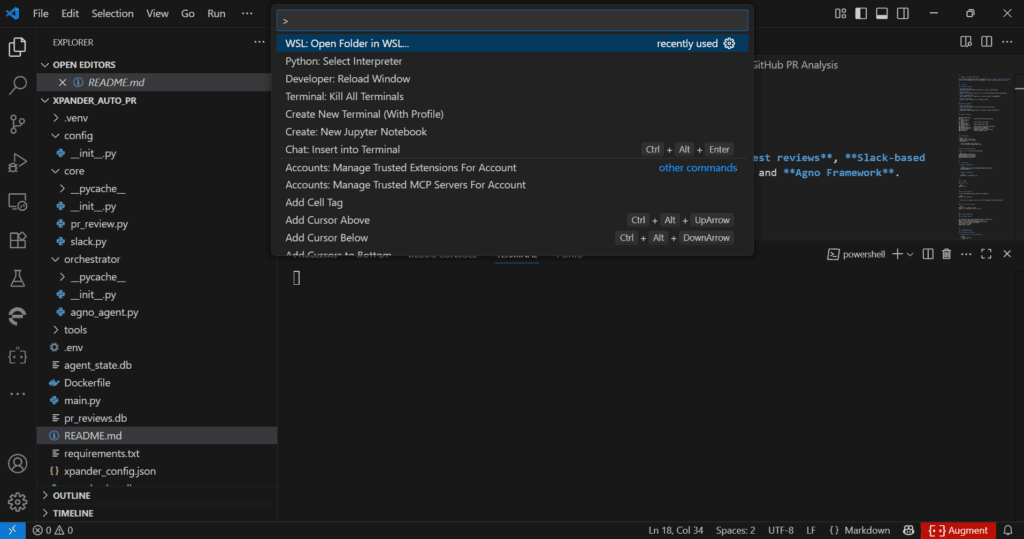
Finally, launch the WSL by opening the project folder on WSL or opening a terminal and running:
This opens VS Code in WSL mode, using the Linux environment.
Now, we will install Node.js v18 and npm, and to do that, run the following in your WSL terminal:
curl -fsSL https://deb.nodesource.com/setup_18.x | sudo -E bash -
sudo apt install -y
curl -fsSL https://deb.nodesource.com/setup_18.x | sudo -E bash -
sudo apt install -y
curl -fsSL https://deb.nodesource.com/setup_18.x | sudo -E bash -
sudo apt install -y
After installing Node.js and npm, make sure you verify the installation:
Now, we will create the virtual environment and activate it. To do that, use this terminal command:
python -m venv venv
venv\Scripts\activate
python -m venv venv
venv\Scripts\activate
python -m venv venv
venv\Scripts\activate
macOS User
For macOS (Terminal), use this command:
python3 -m venv venv
source venv/bin/activate
python3 -m venv venv
source venv/bin/activate
python3 -m venv venv
source venv/bin/activate
Done with the environment setup? Let's install all required dependencies for the project.
We will put all these in a requirements.txt file.
Run the following command in the terminal to install the dependencies:
Now, create a .env file in the root of your project and add your API keys:
GITHUB_TOKEN=your_github_token
SLACK_BOT_TOKEN=your_slack_token
SLACK_CHANNEL_ID=your_channel_id
NEBIUS_API_KEY
GITHUB_TOKEN=your_github_token
SLACK_BOT_TOKEN=your_slack_token
SLACK_CHANNEL_ID=your_channel_id
NEBIUS_API_KEY
GITHUB_TOKEN=your_github_token
SLACK_BOT_TOKEN=your_slack_token
SLACK_CHANNEL_ID=your_channel_id
NEBIUS_API_KEY
For Slack credentials, refer to this - Slack API
After doing all the prerequisites and installation, we are proceeding with the hands-on part for the PR review agent
We used a combination of core logic, an AI agent framework, and integration with xpander.ai platforms to analyse PRs, generate reviews, and facilitate decision-making.
Core Components
Here are the GitHub PR review agents components:
Core Logic Layer
pr_review.py : Initialises the database, summarises PR changes, scores them based on additions/deletions, suggests action items, decides approvals, and stores reviews in SQLite.
slack.py : Sends PR summaries and decisions to Slack to keep the team updated.
Orchestrator and Tools
agno_agent.py : Sets up the AI agent using the Agno framework for multi-agent reasoning and memory.
pr_tools.py : Provides tools like review_pr, which manages the full PR workflow, including approvals, merges, and Slack notifications.
xpander Integration
xpander_handler.py : Integrates with xpander to enable event-driven execution and metric reporting in a scalable backend environment.
CLI Interface
main.py : Offers a command-line interface for testing and direct interaction with the agent, without needing external platforms.
We design this system for enterprise use, aiming to improve PR review efficiency through automation and intelligent decision-making. With the right configuration and environment, we ensure it runs smoothly.
To learn more, visit Agno GitHub and xpander.ai.
Now, let's get started with the code part!
Building pr_tools.py
We built pr_tools.py to streamline and standardise the way teams handle GitHub pull requests using AI. As part of the xpander PR Review system, this tool automates the end-to-end review process. When triggered with a PR URL, it fetches the relevant data from GitHub, analyses the code changes, and applies a set of intelligent review routines summarising diffs, scoring code quality, flagging potential issues, and identifying action items.
Once the analysis is complete, the tool makes an approval decision and can even auto-merge the PR if it meets all criteria. To keep the team in the loop, it sends a clean summary of the review to a designated Slack channel. We also log all review results for transparency and future reference.
With pr_tools.py, we reduce manual review effort, improve consistency across teams, and accelerate the development workflow, without compromising on code quality.
Let’s understand what's happening in this code:
from agno.tools import tool
from github import Github
from xpander_Auto_PR.core.pr_review import (
    summarize_diff, score_pr, generate_action_items,
    final_decision, store_review
)
from xpander_Auto_PR.core.slack import send_slack_message
from dotenv import load_dotenv
import os
from agno.tools import tool
from github import Github
from xpander_Auto_PR.core.pr_review import (
summarize_diff, score_pr, generate_action_items,
final_decision, store_review
)
from xpander_Auto_PR.core.slack import send_slack_message
from dotenv import load_dotenv
import osfrom agno.tools import tool
from github import Github
from xpander_Auto_PR.core.pr_review import (
summarize_diff, score_pr, generate_action_items,
final_decision, store_review
)
from xpander_Auto_PR.core.slack import send_slack_message
from dotenv import load_dotenv
import osWe begin by importing the essential libraries that power the tool. We use agno.tools to define the tool interface, and the github package to communicate with the GitHub API. Our core review logic comes from our custom xpander_Auto_PR library, which handles tasks like analysing code changes and making approval decisions. To keep things secure and configurable, we load environment variables such as API keys using dotenv, and access them through Python’s built-in os module.
@tool(
    name="PRReviewTool",
    description="Analyze a GitHub PR, generate summary, score, action items, decision, and auto-merge if approved.",
    show_result=True,
    stop_after_tool_call=True
)
def review_pr(pr_url: str)
@tool(
    name="PRReviewTool",
    description="Analyze a GitHub PR, generate summary, score, action items, decision, and auto-merge if approved.",
    show_result=True,
    stop_after_tool_call=True
)
def review_pr(pr_url: str)
@tool(
    name="PRReviewTool",
    description="Analyze a GitHub PR, generate summary, score, action items, decision, and auto-merge if approved.",
    show_result=True,
    stop_after_tool_call=True
)
def review_pr(pr_url: str)
We define the review_pr function as a callable tool and register it under the name "PRReviewTool". This allows the PR review logic to be invoked programmatically within the xpander agent workflow or through other tool orchestration systems.
    github_token = os.getenv("GITHUB_TOKEN")
    slack_token = os.getenv("SLACK_BOT_TOKEN")
    slack_channel = os.getenv("SLACK_CHANNEL_ID")
    if not github_token or not slack_token or not slack_channel:
        return {
            "status": "error",
            "message": "Missing GITHUB_TOKEN or Slack credentials in environment variables."
        }
github_token = os.getenv("GITHUB_TOKEN")
slack_token = os.getenv("SLACK_BOT_TOKEN")
slack_channel = os.getenv("SLACK_CHANNEL_ID")
if not github_token or not slack_token or not slack_channel:
return {
"status": "error",
"message": "Missing GITHUB_TOKEN or Slack credentials in environment variables."
} github_token = os.getenv("GITHUB_TOKEN")
slack_token = os.getenv("SLACK_BOT_TOKEN")
slack_channel = os.getenv("SLACK_CHANNEL_ID")
if not github_token or not slack_token or not slack_channel:
return {
"status": "error",
"message": "Missing GITHUB_TOKEN or Slack credentials in environment variables."
}Here, we securely load the required API tokens from environment variables. If any tokens are missing, we halt the process and return an error to avoid proceeding with incomplete credentials.
    g = Github(github_token)
    repo_name, pr_number = extract_repo_and_number(pr_url)
    repo = g.get_repo(repo_name)
    pr = repo.get_pull(pr_number)
    pr_files = pr.get_files()
g = Github(github_token)
repo_name, pr_number = extract_repo_and_number(pr_url)
repo = g.get_repo(repo_name)
pr = repo.get_pull(pr_number)
pr_files = pr.get_files() g = Github(github_token)
repo_name, pr_number = extract_repo_and_number(pr_url)
repo = g.get_repo(repo_name)
pr = repo.get_pull(pr_number)
pr_files = pr.get_files()Now, we connect to the GitHub API using the provided token. We parse the pull request URL to extract the repository name and PR number, then fetch both the pull request object and the list of changed files.
    summary = summarize_diff(pr_files)
    score = score_pr(pr)
    actions = generate_action_items(pr)
    decision = final_decision(score)
summary = summarize_diff(pr_files)
score = score_pr(pr)
actions = generate_action_items(pr)
decision = final_decision(score) summary = summarize_diff(pr_files)
score = score_pr(pr)
actions = generate_action_items(pr)
decision = final_decision(score)Here, we call our imported functions to generate a structured summary, calculate a review score, identify action items, and make a final approval decision based on the review logic.
merge_status = "Skipped"
if decision == "✅ Approve":
    try:
        pr.merge(commit_message="Auto-merged by PR Review Agent ✅")
        merge_status = "Success"
    except Exception as e:
        merge_status = f"Failed: {str(e)}"
merge_status = "Skipped"
if decision == "✅ Approve":
try:
pr.merge(commit_message="Auto-merged by PR Review Agent ✅")
merge_status = "Success"
except Exception as e:
merge_status = f"Failed: {str(e)}"merge_status = "Skipped"
if decision == "✅ Approve":
try:
pr.merge(commit_message="Auto-merged by PR Review Agent ✅")
merge_status = "Success"
except Exception as e:
merge_status = f"Failed: {str(e)}"If the AI's final decision is "✅ Approve", it will try to merge the pull request automatically and also record whether the merge succeeded or failed.
slack_msg = (
f"🔍 GitHub PR Review Summary\n"
f"📦 Repo: {repo_name}\n"
f"🔢 PR: #{pr_number} — {pr.title}\n"
f"📊 Score: {score}/10\n"
f"📝 Summary:\n{summary[:1000]}\n\n"
f"⚙️ Action Items:\n- {'\n- '.join(actions) if actions else 'None'}\n\n"
f"✅ Final Decision: {decision}\n"
f"🔁 Merge Status: {merge_status}"
)
send_slack_message(slack_msg)
slack_msg = (
f"🔍 GitHub PR Review Summary\n"
f"📦 Repo: {repo_name}\n"
f"🔢 PR: #{pr_number} — {pr.title}\n"
f"📊 Score: {score}/10\n"
f"📝 Summary:\n{summary[:1000]}\n\n"
f"⚙️ Action Items:\n- {'\n- '.join(actions) if actions else 'None'}\n\n"
f"✅ Final Decision: {decision}\n"
f"🔁 Merge Status: {merge_status}"
)
send_slack_message(slack_msg)
slack_msg = (
f"🔍 GitHub PR Review Summary\n"
f"📦 Repo: {repo_name}\n"
f"🔢 PR: #{pr_number} — {pr.title}\n"
f"📊 Score: {score}/10\n"
f"📝 Summary:\n{summary[:1000]}\n\n"
f"⚙️ Action Items:\n- {'\n- '.join(actions) if actions else 'None'}\n\n"
f"✅ Final Decision: {decision}\n"
f"🔁 Merge Status: {merge_status}"
)
send_slack_message(slack_msg)A detailed summary message is formatted and sent to a designated Slack channel to notify the team.
How to Build a PR Review Orchestrator?
We built a PRReviewOrchestrator class that manages the lifecycle and execution of our GitHub PR review agent.
First, we loaded environment variables using dotenv to securely access LLM from Nebius AI Studio. Inside the class, we initialised the tools the agent will use, including ThinkingTools for general reasoning and a custom review_pr function for analysing pull requests.
We then configured memory and session storage using SQLite, enabling the agent to maintain both long-term and session-specific context. For the model, we used Qwen3-235B to give summaries and other responses.
Finally, we created a run() method that sets up the agent if it's not already active, applies the tools and memory configuration, and executes the agent logic based on whether it's running in CLI mode or not. Also, we used the Agno Agent framework to manage conversations, tool use, memory, and model responses in one place. It keeps everything organised and reusable.
This setup allows the agent to provide consistent, context-aware responses during PR reviews.
Let’s understand what is happening in the code:
import os
import asyncio
from agno.agent import Agent
from agno.models.nebius import Nebius
from agno.memory.v2.db.sqlite import SqliteMemoryDb
from agno.memory.v2.memory import Memory
from agno.storage.sqlite import SqliteStorage
from agno.tools.thinking import ThinkingTools
from xpander_utils.sdk.adapters import AgnoAdapter
from xpander_Auto_PR.tools.pr_tools import review_pr
DB_FILE = "agent_state.db"
from dotenv import load_dotenv
import os
load_dotenv()
import os
import asyncio
from agno.agent import Agent
from agno.models.nebius import Nebius
from agno.memory.v2.db.sqlite import SqliteMemoryDb
from agno.memory.v2.memory import Memory
from agno.storage.sqlite import SqliteStorage
from agno.tools.thinking import ThinkingTools
from xpander_utils.sdk.adapters import AgnoAdapter
from xpander_Auto_PR.tools.pr_tools import review_pr
DB_FILE = "agent_state.db"
from dotenv import load_dotenv
import os
load_dotenv()
import os
import asyncio
from agno.agent import Agent
from agno.models.nebius import Nebius
from agno.memory.v2.db.sqlite import SqliteMemoryDb
from agno.memory.v2.memory import Memory
from agno.storage.sqlite import SqliteStorage
from agno.tools.thinking import ThinkingTools
from xpander_utils.sdk.adapters import AgnoAdapter
from xpander_Auto_PR.tools.pr_tools import review_pr
DB_FILE = "agent_state.db"
from dotenv import load_dotenv
import os
load_dotenv()
Here, we’re pulling in all the required libraries. We import Agno’s building blocks like Agent, Memory, and model wrappers, along with tools like ThinkingTools. We also load review_pr, which is our custom function that knows how to analyse a pull request.
class PRReviewOrchestrator:
    def __init__(self, agent_backend: AgnoAdapter):
        self.agent_backend = agent_backend
        self.agent = None
        self.tools = [ThinkingTools(add_instructions=True), review_pr]
class PRReviewOrchestrator:
def __init__(self, agent_backend: AgnoAdapter):
self.agent_backend = agent_backend
self.agent = None
self.tools = [ThinkingTools(add_instructions=True), review_pr]class PRReviewOrchestrator:
def __init__(self, agent_backend: AgnoAdapter):
self.agent_backend = agent_backend
self.agent = None
self.tools = [ThinkingTools(add_instructions=True), review_pr]The PRReviewOrchestrator manages everything. In the constructor, we save the backend adapter and prepare the tools the agent will use. One is Agno's native reasoning tool (ThinkingTools), and the other is our custom PR review tool (review_pr).
        self.memory = Memory(
            model=Nebius(id="Qwen/Qwen3-235B-A22B", api_key=os.getenv("NEBIUS_API_KEY")),
            db=SqliteMemoryDb(table_name="user_memories", db_file=DB_FILE)
        )
self.storage = SqliteStorage(table_name="agent_sessions", db_file=DB_FILE) self.memory = Memory(
model=Nebius(id="Qwen/Qwen3-235B-A22B", api_key=os.getenv("NEBIUS_API_KEY")),
db=SqliteMemoryDb(table_name="user_memories", db_file=DB_FILE)
)
self.storage = SqliteStorage(table_name="agent_sessions", db_file=DB_FILE) self.memory = Memory(
model=Nebius(id="Qwen/Qwen3-235B-A22B", api_key=os.getenv("NEBIUS_API_KEY")),
db=SqliteMemoryDb(table_name="user_memories", db_file=DB_FILE)
)
self.storage = SqliteStorage(table_name="agent_sessions", db_file=DB_FILE)Here, we’re wiring in long-term memory using Agno’s Memory class. It uses the Qwen3-235B-A22B model from Nebius AI Studio and stores user memories in a SQLite database (user_memories table). Alongside that, we configure a storage system that tracks different agent sessions, which allows for stateful, contextual interactions across runs.
How to Build the Core Logic Layer?
Building the pr_review.py
We built pr_review.py as the core logic layer for analysing GitHub pull requests. It powers the full review workflow, from summarising code changes to scoring PR quality and suggesting next steps. We also store all review results locally using SQLite for easy access and future reference.
Let's see what's happening in the code:
import sqlite3
DB_PATH = "pr_reviews.db"
def init_db():
    conn = sqlite3.connect(DB_PATH)
    cursor = conn.cursor()
    cursor.execute('''
        CREATE TABLE IF NOT EXISTS pr_reviews (
            id INTEGER PRIMARY KEY AUTOINCREMENT,
            repo TEXT,
            pr_number INTEGER,
            title TEXT,
            summary TEXT,
            score INTEGER,
            actions TEXT,
            decision TEXT,
            reviewed_at TEXT
        )
    ''')
    conn.commit()
    conn.close()
init_db()
import sqlite3
DB_PATH = "pr_reviews.db"
def init_db():
conn = sqlite3.connect(DB_PATH)
cursor = conn.cursor()
cursor.execute('''
CREATE TABLE IF NOT EXISTS pr_reviews (
id INTEGER PRIMARY KEY AUTOINCREMENT,
repo TEXT,
pr_number INTEGER,
title TEXT,
summary TEXT,
score INTEGER,
actions TEXT,
decision TEXT,
reviewed_at TEXT
)
''')
conn.commit()
conn.close()
init_db()import sqlite3
DB_PATH = "pr_reviews.db"
def init_db():
conn = sqlite3.connect(DB_PATH)
cursor = conn.cursor()
cursor.execute('''
CREATE TABLE IF NOT EXISTS pr_reviews (
id INTEGER PRIMARY KEY AUTOINCREMENT,
repo TEXT,
pr_number INTEGER,
title TEXT,
summary TEXT,
score INTEGER,
actions TEXT,
decision TEXT,
reviewed_at TEXT
)
''')
conn.commit()
conn.close()
init_db()We started by creating a local SQLite database ( pr_reviews.db ) to store review metadata. On import, the module calls init_db(), which sets up a pr_reviews table if it doesn't already exist. This gives us persistent storage for PR reviews without relying on external infrastructure.
def summarize_diff(pr_files) -> str:
if not pr_files:
return "No files changed in this PR."
summary_lines = []
for f in pr_files:
filename = f.filename
additions = f.additions
deletions = f.deletions
changes = f.changes
patch = f.patch or ""
summary_lines.append(
f"📄 {filename}\n"
f"- ➕ {additions} additions\n"
f"- ➖ {deletions} deletions\n"
f"- 🔄 {changes} total changes\n"
)
if patch:
diff_preview = "\n".join(patch.splitlines()[:10])
summary_lines.append(f"diff\n{diff_preview}\n...")
summary_lines.append("")
return "\n".join(summary_lines)def summarize_diff(pr_files) -> str:
if not pr_files:
return "No files changed in this PR."
summary_lines = []
for f in pr_files:
filename = f.filename
additions = f.additions
deletions = f.deletions
changes = f.changes
patch = f.patch or ""
summary_lines.append(
f"📄 {filename}\n"
f"- ➕ {additions} additions\n"
f"- ➖ {deletions} deletions\n"
f"- 🔄 {changes} total changes\n"
)
if patch:
diff_preview = "\n".join(patch.splitlines()[:10])
summary_lines.append(f"diff\n{diff_preview}\n...")
summary_lines.append("")
return "\n".join(summary_lines)def summarize_diff(pr_files) -> str:
if not pr_files:
return "No files changed in this PR."
summary_lines = []
for f in pr_files:
filename = f.filename
additions = f.additions
deletions = f.deletions
changes = f.changes
patch = f.patch or ""
summary_lines.append(
f"📄 {filename}\n"
f"- ➕ {additions} additions\n"
f"- ➖ {deletions} deletions\n"
f"- 🔄 {changes} total changes\n"
)
if patch:
diff_preview = "\n".join(patch.splitlines()[:10])
summary_lines.append(f"diff\n{diff_preview}\n...")
summary_lines.append("")
return "\n".join(summary_lines)To make PRs easier to scan, we wrote a summarize_diff() function that builds a human-readable summary of all file-level changes.
This summary is designed to be human-readable, especially when rendered in Slack or CLI. It prioritises brevity while still giving a quick view of what was touched in the codebase.
def score_pr(pr):
    score = 10
    if pr.additions > 500:
        score -= 2
    if pr.deletions > pr.additions:
        score -= 1
    if not pr.body:
        score -= 1
    return max(score, 0)
def score_pr(pr):
score = 10
if pr.additions > 500:
score -= 2
if pr.deletions > pr.additions:
score -= 1
if not pr.body:
score -= 1
return max(score, 0)def score_pr(pr):
score = 10
if pr.additions > 500:
score -= 2
if pr.deletions > pr.additions:
score -= 1
if not pr.body:
score -= 1
return max(score, 0)We introduced a basic scoring function that assigns each PR a score out of 10 using simple heuristics:
We penalise very large PRs (over 500 additions).
We deduct points if the PR removes more code than it adds.
If the PR has no description (body), we subtract again.
These rules help flag high-risk or low-context PRs early. We keep the logic transparent and easy to adjust
def generate_action_items(pr):
    items = []
    if "fix" in pr.title.lower() and "test" not in pr.title.lower():
        items.append("Add test cases for the fix.")
    if pr.additions > 1000:
        items.append("Break the PR into smaller parts.")
    return items
def generate_action_items(pr):
items = []
if "fix" in pr.title.lower() and "test" not in pr.title.lower():
items.append("Add test cases for the fix.")
if pr.additions > 1000:
items.append("Break the PR into smaller parts.")
return itemsdef generate_action_items(pr):
items = []
if "fix" in pr.title.lower() and "test" not in pr.title.lower():
items.append("Add test cases for the fix.")
if pr.additions > 1000:
items.append("Break the PR into smaller parts.")
return itemsWe implemented a rule-based system to suggest improvements or reminders during PR reviews. For example, if a PR title mentions a fix but doesn’t mention tests, we prompt the contributor to add test cases. If the PR includes over 1000 additions, we recommend breaking it into smaller parts. These suggestions don’t block the review; they simply guide contributors toward better practices.
def final_decision(score):
    return "✅ Approve" if score >= 7 else "❌ Push Back"
def store_review(repo, pr_number, title, summary, score, actions, decision):
    conn = sqlite3.connect(DB_PATH)
    cursor = conn.cursor()
    cursor.execute('''
        INSERT INTO pr_reviews (repo, pr_number, title, summary, score, actions, decision, reviewed_at)
        VALUES (?, ?, ?, ?, ?, ?, ?, ?)
    ''', (repo, pr_number, title, summary, score, json.dumps(actions), decision, datetime.now().isoformat()))
    conn.commit()
    conn.close()
def final_decision(score):
return "✅ Approve" if score >= 7 else "❌ Push Back"
def store_review(repo, pr_number, title, summary, score, actions, decision):
conn = sqlite3.connect(DB_PATH)
cursor = conn.cursor()
cursor.execute('''
INSERT INTO pr_reviews (repo, pr_number, title, summary, score, actions, decision, reviewed_at)
VALUES (?, ?, ?, ?, ?, ?, ?, ?)
''', (repo, pr_number, title, summary, score, json.dumps(actions), decision, datetime.now().isoformat()))
conn.commit()
conn.close()def final_decision(score):
return "✅ Approve" if score >= 7 else "❌ Push Back"
def store_review(repo, pr_number, title, summary, score, actions, decision):
conn = sqlite3.connect(DB_PATH)
cursor = conn.cursor()
cursor.execute('''
INSERT INTO pr_reviews (repo, pr_number, title, summary, score, actions, decision, reviewed_at)
VALUES (?, ?, ?, ?, ?, ?, ?, ?)
''', (repo, pr_number, title, summary, score, json.dumps(actions), decision, datetime.now().isoformat()))
conn.commit()
conn.close()We set a simple threshold: if a PR scores 7 or more, we mark it as approved. Otherwise, we push it back.
Finally, we wrote a store_review() function that inserts each review into the SQLite database. This includes the full context, repo name, PR title, score, decision, action items, and timestamp.
Building the slack.py
We built slack.py to send real-time PR review updates directly to Slack. This function notifies the developers or teams the moment a review is completed, without needing to leave their existing workflows.
Let's see what's happening in the code:
def send_slack_message(text: str):
    from dotenv import load_dotenv
    import os
    import requests
    import json
    load_dotenv()
    slack_token = os.getenv("SLACK_BOT_TOKEN")
    slack_channel = os.getenv("SLACK_CHANNEL_ID")
    if not slack_token or not slack_channel:
        print("Slack token or channel missing!")
        return {
            "status": "error",
            "message": "Slack credentials not set in environment variables."
        }
def send_slack_message(text: str):
from dotenv import load_dotenv
import os
import requests
import json
load_dotenv()
slack_token = os.getenv("SLACK_BOT_TOKEN")
slack_channel = os.getenv("SLACK_CHANNEL_ID")
if not slack_token or not slack_channel:
print("Slack token or channel missing!")
return {
"status": "error",
"message": "Slack credentials not set in environment variables."
}def send_slack_message(text: str):
from dotenv import load_dotenv
import os
import requests
import json
load_dotenv()
slack_token = os.getenv("SLACK_BOT_TOKEN")
slack_channel = os.getenv("SLACK_CHANNEL_ID")
if not slack_token or not slack_channel:
print("Slack token or channel missing!")
return {
"status": "error",
"message": "Slack credentials not set in environment variables."
}We wrote send_slack_message(text: str) to handle outgoing messages. It pulls the Slack bot token and channel ID and uses them to post messages via Slack’s chat.postMessage API.
headers = {
"Authorization": f"Bearer {slack_token}",
"Content-Type": "application/json"
}
payload = {
"channel": slack_channel,
"text": text,
"unfurl_links": False
}
try:
response = requests.post(
"https://slack.com/api/chat.postMessage",
headers=headers,
data=json.dumps(payload)
)
result = response.json()
print("Slack API Response:", result)
return {"status": "sent" if result.get("ok") else "error", "response": result}
except Exception as e:
return {"status": "error", "message": str(e)}headers = {
"Authorization": f"Bearer {slack_token}",
"Content-Type": "application/json"
}
payload = {
"channel": slack_channel,
"text": text,
"unfurl_links": False
}
try:
response = requests.post(
"https://slack.com/api/chat.postMessage",
headers=headers,
data=json.dumps(payload)
)
result = response.json()
print("Slack API Response:", result)
return {"status": "sent" if result.get("ok") else "error", "response": result}
except Exception as e:
return {"status": "error", "message": str(e)}headers = {
"Authorization": f"Bearer {slack_token}",
"Content-Type": "application/json"
}
payload = {
"channel": slack_channel,
"text": text,
"unfurl_links": False
}
try:
response = requests.post(
"https://slack.com/api/chat.postMessage",
headers=headers,
data=json.dumps(payload)
)
result = response.json()
print("Slack API Response:", result)
return {"status": "sent" if result.get("ok") else "error", "response": result}
except Exception as e:
return {"status": "error", "message": str(e)}When we send a message, we include the text and turn off link unfurling to avoid clutter—especially when posting PR summaries or code diffs. The function returns a status (sent or error) along with the raw response so we can debug or log as needed.
How the PR agent connects to the xpander SDK
Now, we will integrate the PR agent with the xpander SDK, which enables the agent to respond to UI-based prompts and actions(like button clicks or chat messages) through the xpander platform.
import json
import asyncio
import os
from xpander_utils.events import XpanderEventListener, AgentExecutionResult, AgentExecution
from xpander_utils.sdk.adapters import AgnoAdapter
from pathlib import Path
from dotenv import load_dotenv
from orchestrator.agno_agent import PRReviewOrchestrator
from xpander_sdk import LLMTokens, Tokens
load_dotenv()
CFG_PATH = Path("xpander_config.json")
if not CFG_PATH.exists():
raise FileNotFoundError("Missing xpander_config.json")
xpander_cfg: dict = json.loads(CFG_PATH.read_text())
xpander_backend: AgnoAdapter = asyncio.run(
asyncio.to_thread(AgnoAdapter, agent_id=xpander_cfg["agent_id"], api_key=xpander_cfg["api_key"])
)
agno_agent_orchestrator = PRReviewOrchestrator(xpander_backend)
async def on_execution_request(execution_task: AgentExecution) -> AgentExecutionResult:
"""
Callback triggered when an execution request is received from a registered agent.
Args:
execution_task (AgentExecution): Object containing execution metadata and input.
Returns:
AgentExecutionResult: Object describing the output of the execution.
"""
try:
await asyncio.to_thread(xpander_backend.agent.init_task, execution=execution_task.model_dump())
IncomingEvent = (
f"Incoming message: {execution_task.input.text}\n"
f"From user: {execution_task.input.user.first_name} "
f"{execution_task.input.user.last_name}\n"
f"Email: {execution_task.input.user.email}"
)
agent_response = await agno_agent_orchestrator.run(IncomingEvent, execution_task.input.user.id, execution_task.memory_thread_id)
metrics = agent_response.metrics
llm_tokens = LLMTokens(
completion_tokens=sum(metrics['completion_tokens']),
prompt_tokens=sum(metrics['prompt_tokens']),
total_tokens=sum(metrics['total_tokens']),
)
xpander_backend.agent.report_execution_metrics(llm_tokens=Tokens(worker=llm_tokens), ai_model=agent_response.model, source_node_type="agno")
except Exception as e:
return AgentExecutionResult(result=str(e), is_success=False)
return AgentExecutionResult(result=agent_response.content, is_success=True)
listener = XpanderEventListener(**xpander_cfg)
listener.register(on_execution_request=on_execution_request)import json
import asyncio
import os
from xpander_utils.events import XpanderEventListener, AgentExecutionResult, AgentExecution
from xpander_utils.sdk.adapters import AgnoAdapter
from pathlib import Path
from dotenv import load_dotenv
from orchestrator.agno_agent import PRReviewOrchestrator
from xpander_sdk import LLMTokens, Tokens
load_dotenv()
CFG_PATH = Path("xpander_config.json")
if not CFG_PATH.exists():
raise FileNotFoundError("Missing xpander_config.json")
xpander_cfg: dict = json.loads(CFG_PATH.read_text())
xpander_backend: AgnoAdapter = asyncio.run(
asyncio.to_thread(AgnoAdapter, agent_id=xpander_cfg["agent_id"], api_key=xpander_cfg["api_key"])
)
agno_agent_orchestrator = PRReviewOrchestrator(xpander_backend)
async def on_execution_request(execution_task: AgentExecution) -> AgentExecutionResult:
"""
Callback triggered when an execution request is received from a registered agent.
Args:
execution_task (AgentExecution): Object containing execution metadata and input.
Returns:
AgentExecutionResult: Object describing the output of the execution.
"""
try:
await asyncio.to_thread(xpander_backend.agent.init_task, execution=execution_task.model_dump())
IncomingEvent = (
f"Incoming message: {execution_task.input.text}\n"
f"From user: {execution_task.input.user.first_name} "
f"{execution_task.input.user.last_name}\n"
f"Email: {execution_task.input.user.email}"
)
agent_response = await agno_agent_orchestrator.run(IncomingEvent, execution_task.input.user.id, execution_task.memory_thread_id)
metrics = agent_response.metrics
llm_tokens = LLMTokens(
completion_tokens=sum(metrics['completion_tokens']),
prompt_tokens=sum(metrics['prompt_tokens']),
total_tokens=sum(metrics['total_tokens']),
)
xpander_backend.agent.report_execution_metrics(llm_tokens=Tokens(worker=llm_tokens), ai_model=agent_response.model, source_node_type="agno")
except Exception as e:
return AgentExecutionResult(result=str(e), is_success=False)
return AgentExecutionResult(result=agent_response.content, is_success=True)
listener = XpanderEventListener(**xpander_cfg)
listener.register(on_execution_request=on_execution_request)import json
import asyncio
import os
from xpander_utils.events import XpanderEventListener, AgentExecutionResult, AgentExecution
from xpander_utils.sdk.adapters import AgnoAdapter
from pathlib import Path
from dotenv import load_dotenv
from orchestrator.agno_agent import PRReviewOrchestrator
from xpander_sdk import LLMTokens, Tokens
load_dotenv()
CFG_PATH = Path("xpander_config.json")
if not CFG_PATH.exists():
raise FileNotFoundError("Missing xpander_config.json")
xpander_cfg: dict = json.loads(CFG_PATH.read_text())
xpander_backend: AgnoAdapter = asyncio.run(
asyncio.to_thread(AgnoAdapter, agent_id=xpander_cfg["agent_id"], api_key=xpander_cfg["api_key"])
)
agno_agent_orchestrator = PRReviewOrchestrator(xpander_backend)
async def on_execution_request(execution_task: AgentExecution) -> AgentExecutionResult:
"""
Callback triggered when an execution request is received from a registered agent.
Args:
execution_task (AgentExecution): Object containing execution metadata and input.
Returns:
AgentExecutionResult: Object describing the output of the execution.
"""
try:
await asyncio.to_thread(xpander_backend.agent.init_task, execution=execution_task.model_dump())
IncomingEvent = (
f"Incoming message: {execution_task.input.text}\n"
f"From user: {execution_task.input.user.first_name} "
f"{execution_task.input.user.last_name}\n"
f"Email: {execution_task.input.user.email}"
)
agent_response = await agno_agent_orchestrator.run(IncomingEvent, execution_task.input.user.id, execution_task.memory_thread_id)
metrics = agent_response.metrics
llm_tokens = LLMTokens(
completion_tokens=sum(metrics['completion_tokens']),
prompt_tokens=sum(metrics['prompt_tokens']),
total_tokens=sum(metrics['total_tokens']),
)
xpander_backend.agent.report_execution_metrics(llm_tokens=Tokens(worker=llm_tokens), ai_model=agent_response.model, source_node_type="agno")
except Exception as e:
return AgentExecutionResult(result=str(e), is_success=False)
return AgentExecutionResult(result=agent_response.content, is_success=True)
listener = XpanderEventListener(**xpander_cfg)
listener.register(on_execution_request=on_execution_request)We designed this as a critical bridge between our PR review agent and the xpander platform, enabling it to operate as a fully managed service. We start by loading environment variables (like Slack/GitHub tokens) and the agent's configuration.
Our AgnoAdapter establishes a connection to xpander's backend, while our PRReviewOrchestrator wraps the core review logic.
listener = XpanderEventListener(**xpander_cfg)
listener.register(on_execution_request=on_execution_request)
listener = XpanderEventListener(**xpander_cfg)
listener.register(on_execution_request=on_execution_request)
listener = XpanderEventListener(**xpander_cfg)
listener.register(on_execution_request=on_execution_request)
The core function we implement, on_execution_request serves as a callback for xpander’s event system. It handles incoming PR review requests, extracts user metadata (such as name and email), and delegates the task to our orchestrator for processing.
Crucially, we've implemented token usage tracking that reports LLM consumption and execution metrics back to xpander for monitoring and billing.
async def on_execution_request(execution_task: AgentExecution) -> AgentExecutionResult
async def on_execution_request(execution_task: AgentExecution) -> AgentExecutionResult
async def on_execution_request(execution_task: AgentExecution) -> AgentExecutionResult
We configured the XpanderEventListener to register this callback, creating our persistent, event-driven service that handles requests automatically. Unlike our main.py implementation, we specifically designed this script for production deployment, supporting Docker, handling real user data, and integrating with Slack/GitHub via environment variables. Through this architecture, we've transformed our agent from a local tool into a scalable, platform-native service complete with proper authentication, error handling, and analytics capabilities.
How main.py Powers CLI-Based Agent Execution?
In main.py, we’ve set up a simple yet powerful entry point to run the xpander PR Review Agent in a command-line interface (CLI) environment.
import asyncio
import json
from pathlib import Path
from orchestrator.agno_agent import PRReviewOrchestrator
from xpander_utils.sdk.adapters import AgnoAdapter
import asyncio
import json
from pathlib import Path
from orchestrator.agno_agent import PRReviewOrchestrator
from xpander_utils.sdk.adapters import AgnoAdapter
import asyncio
import json
from pathlib import Path
from orchestrator.agno_agent import PRReviewOrchestrator
from xpander_utils.sdk.adapters import AgnoAdapter
We start by importing essential modules:
asyncio for handling asynchronous operations,
json and Path to load our configuration from xpander_config.json,
PRReviewOrchestrator to handle the review logic,
AgnoAdapter to connect our orchestrator with the xpander backend.
CFG_PATH = Path("xpander_config.json")
xpander_cfg = json.loads(CFG_PATH.read_text())
CFG_PATH = Path("xpander_config.json")
xpander_cfg = json.loads(CFG_PATH.read_text())CFG_PATH = Path("xpander_config.json")
xpander_cfg = json.loads(CFG_PATH.read_text())We read the xpander_config.json file to load agent credentials, such as the agent_id and api_key. This allows us to securely connect to our AI backend.
async def main():
    xpander_backend = AgnoAdapter(
        agent_id=xpander_cfg["agent_id"],
        api_key=xpander_cfg["api_key"]
    )
    orchestrator = PRReviewOrchestrator(xpander_backend)
async def main():
xpander_backend = AgnoAdapter(
agent_id=xpander_cfg["agent_id"],
api_key=xpander_cfg["api_key"]
)
orchestrator = PRReviewOrchestrator(xpander_backend)async def main():
xpander_backend = AgnoAdapter(
agent_id=xpander_cfg["agent_id"],
api_key=xpander_cfg["api_key"]
)
orchestrator = PRReviewOrchestrator(xpander_backend)In the main() function, we initialise the backend adapter using credentials from the config file. We then pass this adapter to PRReviewOrchestrator, which acts as the controller that interprets user inputs and generates review-related outputs.
    while True:
        message = input("\nYou: ")
        if message.lower() in ["exit", "quit"]:
            break
while True:
message = input("\nYou: ")
if message.lower() in ["exit", "quit"]:
break while True:
message = input("\nYou: ")
if message.lower() in ["exit", "quit"]:
breakWe enter a loop that waits for user input from the terminal. Typing exit or quit ends the session.
        response = await orchestrator.run(
            message=message,
            user_id="user123",
            session_id="session456",
            cli=True
        )
response = await orchestrator.run(
message=message,
user_id="user123",
session_id="session456",
cli=True
) response = await orchestrator.run(
message=message,
user_id="user123",
session_id="session456",
cli=True
)Each user message is passed to the orchestrator. We include dummy user and session IDs to simulate a conversation. Setting cli=True tells the orchestrator to return a plain text response suitable for display in the terminal.
if __name__ == "__main__":
    asyncio.run(main())
if __name__ == "__main__":
asyncio.run(main())if __name__ == "__main__":
asyncio.run(main())Finally, we launch the main() function using Python's asyncio.run() to handle asynchronous execution properly.
Testing the GitHub PR Review Agent
Open the terminal and write the following command:
This executes the main script and kicks off xpander’s core operations directly from the terminal.
Now, to access enhanced features and UI, launch the assistant with this command:
This starts the full-featured UI, giving us a more visual way to manage PR reviews and workflows.
Note:
Before we run either script, make sure:
The personal xpander_config.json configured
The Valid API credentials set up
The Proper permissions for all operations
Now, for containerised environments or team-based deployment, we use Docker.
For that, first build the container and to do so, open your terminal and write this command:
This command packages our application into a Docker image, ready for deployment.
Now run this with:
We use this to launch the service, making it accessible on port 8080.
After running the container, open http://localhost:8080 in your browser.
Outputs of the PR Review Agent
Let’s check how our PR Review agent works.
Let’s prompt the agent:
Prompt: “Please clone my repo and do a PR on the following: https://github.com/rohitg00/kubectl-mcp-server/pull/25 also send a notification on slack for the same”
OR
Just simply share the link to the PR
GUI Output on xpander.ai Platform
Here, we share a PR from the public kubectl-mcp-server repo.
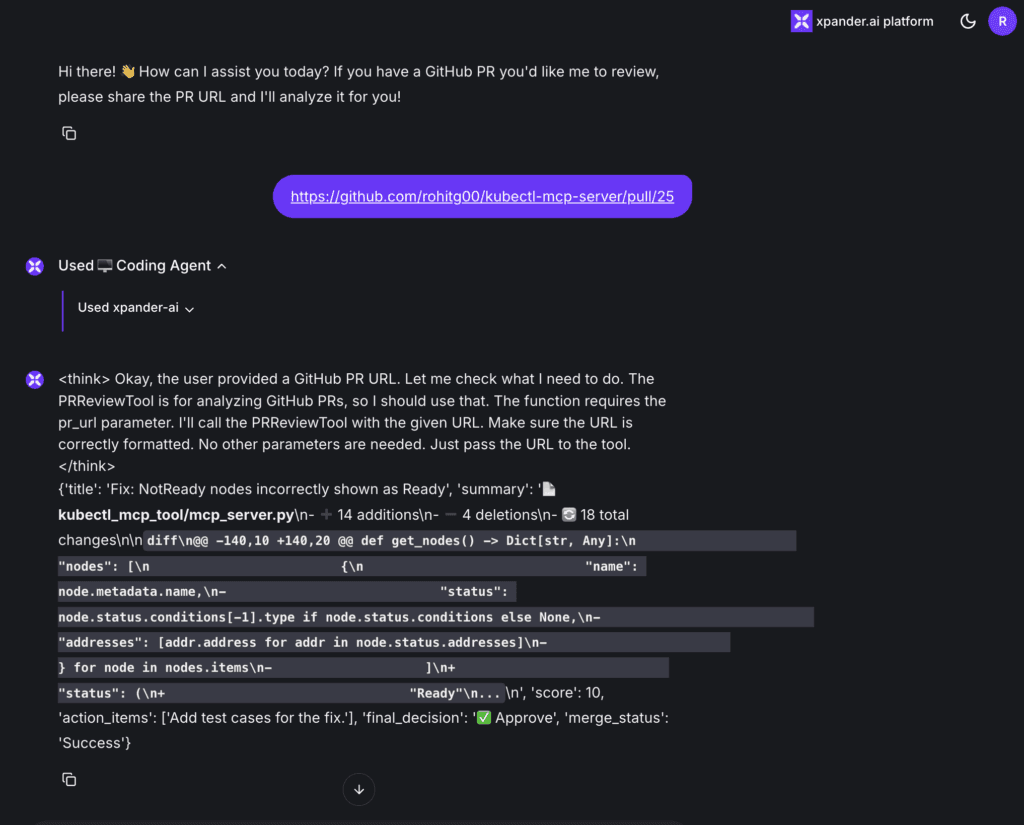
The agent analysed our GitHub PR using the PRReviewTool, generated a detailed summary and approval decision, and attempted an auto-merge.
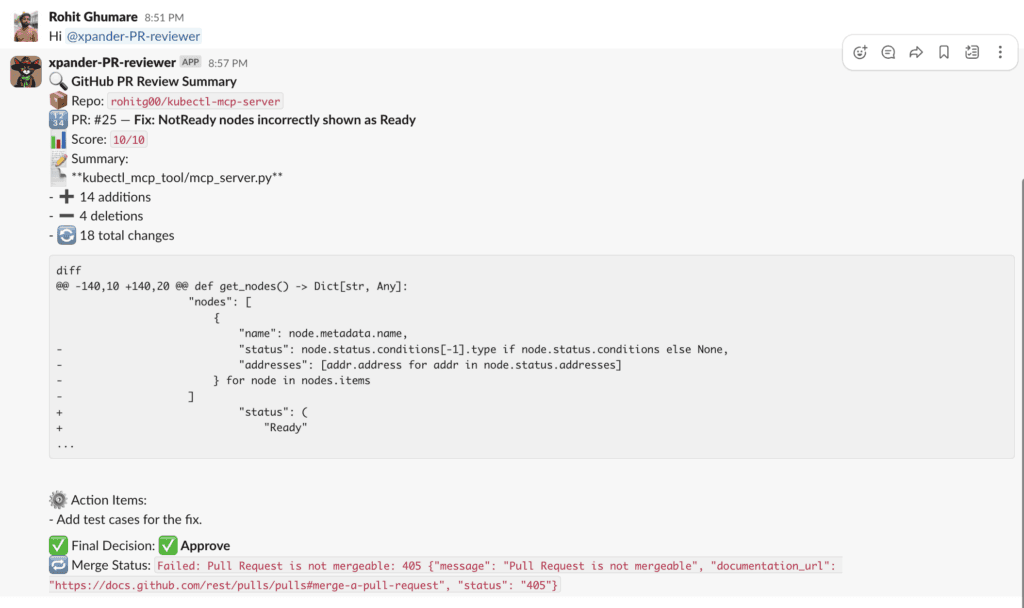
Agent also posted the entire review summary, including the diff, score, and final decision, to the designated Slack channel for team visibility.
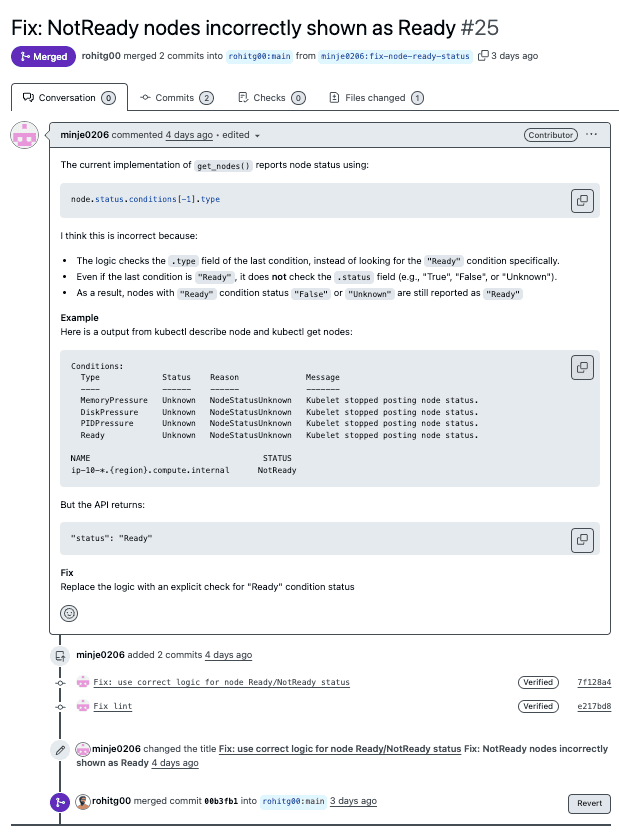
Here is the merged PR -
You can also achieve the same by passing the PR URL in the CLI.
Conclusion
With this implementation, we demonstrate how AI can meaningfully support code reviews by automating repetitive analysis without removing human oversight from the loop. Here’s how the system works:
We analyse pull request diffs to generate clear, concise summaries
We apply consistent scoring based on factors like code changes and test coverage
We flag potential issues to assist human reviewers in focusing on what matters
And when appropriate, we handle straightforward merges automatically
This approach helps us cut down on routine review tasks, especially in fast-moving repositories with a high volume of small PRs. More importantly, it provides a flexible foundation that we can tailor to fit our team's unique workflows, while still maintaining full control over the review and merge process.
For technical details on the xpander integration, see: xpander.ai Documentation


