

Your agent pilot worked. A small team used it for a month, the results were good, and now you want to roll it out. Then the rollout meeting starts, and IT, security, architecture and finance each ask a question that nobody in the room can answer.
Strategy, skills and data also slow AI adoption. This post covers the last gate: the meeting where IT, security, architecture and finance decide if an agent goes to production.
That meeting is where agent pilots stall. IBM asked 2,000 technology leaders, and "only 11% of respondents say they're completely prepared for the scale of AI agent deployment." (IBM newsroom, June 8, 2026)
The gap between buying AI and using it
Companies are spending. In PwC's May 2025 survey of 300 senior US executives, "88% say their team or business function plans to increase AI-related budgets in the next 12 months due to agentic AI." (PwC AI Agent Survey)
Use has not kept up. In the same survey, "most (68%) report that half or fewer of their employees interact with agents in their everyday work." So 88% plan to spend more on agents, yet in 68% of companies, half or fewer of the staff use one.
PwC's top-ranked challenges were cybersecurity and cost, at 34% each, and PwC calls them "safe excuses". It names the real challenges in the next sentence: "the ability to connect AI agents across applications and workflows (19%), organizational change to keep pace with AI (17%) and employee adoption (14%)." This post covers the meeting where those two, security and cost, come up. They are excuses only when someone in the room can answer them.
Trust is another barrier: 28% ranked it a top-three challenge. Trust drops for high-stakes work. Only 20% trust agents with financial transactions. Question 2 below is where an agent earns that trust.
IBM found the gap behind it: control. In its study, "two-thirds of surveyed CIOs and CTOs report being held accountable for AI systems they do not fully control." IBM's CIO, Matt Lyteson, says the work now is "embedding control and visibility from the start, so they can scale with confidence." (IBM newsroom)
A pilot hides this gap. It has a few users, limited data and someone watching every answer. Production removes all three.
The four questions that stall a pilot
1. IT asks: what agents exist, and who owns each one?
In IBM's study, "the majority of surveyed executives (70%) say teams across the business are deploying technology faster than IT can track." (IBM newsroom) Gartner predicts that by 2028 the average global Fortune 500 enterprise will use over 150,000 AI agents. Only 13% of organizations believe they have the right governance in place to manage them. Gartner's first steps are clear agent policies and a central inventory of agents. (Gartner, April 28, 2026)
If IT cannot list the agents, it cannot approve one more.
A good answer: one list where each agent shows who made it, who may use it, what systems it can reach, which model it runs on and where it runs.
2. Security asks: what can each agent do, and who approves the risky step?
A pilot agent suggests. A production agent acts: it updates records, sends messages, changes infrastructure. IBM found that surveyed organizations "experienced an average of 54 AI agent incidents last year". Of those, 17% were high severity. Of the high-severity incidents, "37% resulted in data exposure or security breaches." (IBM newsroom)
A log you read the next day does not undo an action. The control has to sit before the action, with a named person for the steps that matter.
A good answer: "The agent reads tickets and logs on its own. Deleting a workload, running terraform destroy or emailing a customer waits for the platform lead. The command does not run until that person approves."
3. Architecture asks: what happens when we change model vendor?
Models retire on a schedule. Anthropic retired claude-sonnet-4-20250514 on June 15, 2026, and after that date "requests to retired models fail." (Anthropic model deprecations) Code that names that model has to be changed by hand, in every place that names it.
IBM found that organizations that planned early for flexibility, "keeping workloads portable and models replaceable," "reported a 10% higher return on AI investment in 2025."
A good answer: "The agent's model is a setting in the platform, not in code. We change it in one place, and new conversations use the new model. People's coding tools call our own name for a model, default-coding, with a fallback. We can list the agents on each model, so we move them before the retirement date."
4. Finance asks: what will it cost, and who stops the spend?
Agents run in the background and call models and tools many times per task. Anthropic measured it on its own systems: "agents typically use about 4× more tokens than chat interactions, and multi-agent systems use about 15× more tokens than chats." (Anthropic engineering)
IBM found that "84% of tech CxOs have not fully operationalized AI financial management, and 85% still lack full visibility into real-time AI spend." (IBM newsroom) Finance will not approve a cost it cannot see or cap. A month-end report tells you after the money is spent.
A good answer: "Each agent has a monthly cap, and so does each person. We get a warning at 75%. At 100%, the agent finishes the turn it is on and starts no new turns until next month. We size each agent's cap from the pilot."
The sizing is one line of math. Open Usage, grouped by agent, and read the pilot month. A pilot of 10 people that cost $400 in a month is $40 per person. For 200 people, that is $8,000 a month for this agent.
The options teams use today
Option | Where it wins | What it costs you |
|---|---|---|
Keep agents in a pilot group | No new risk. Good for learning. | No adoption. The value stays with a few people. |
A review board approves each agent | Real human judgment on each case. | Slow. The board becomes the bottleneck as the number of agents grows. |
One AI vendor's enterprise plan: ChatGPT Enterprise, Claude Enterprise or Microsoft Copilot Studio | Good admin controls, SSO and records inside that vendor's tools. | A separate set of rules, logs and bills for each vendor, and agents run only on the models that vendor offers. |
A cloud agent platform: AWS Bedrock AgentCore, Google Vertex AI Agent Engine or Microsoft Foundry | Strong for agents you build and run on that cloud, next to your data there. | One cloud. Claude Code, Codex and OpenCode, and the agents people run in them, stay outside it. |
Build an internal platform | Fits your systems exactly. | A team to build it and a team to keep it running. |
A governed agent platform | One set of identity, approvals, budgets and records for every agent it runs, on the models you approve. | Another platform to choose and run. Check that it runs where your data lives. |
Whichever you pick, build the control in. IBM found that organizations that build control into their AI systems "deploy 16x more AI agents than those relying on manual governance." (IBM newsroom)
Checklist: is this agent ready for production?
Answer yes or no for each agent before the rollout meeting. Every "no" is a question that will come up.
IT
The agent is in a list of agents, with the person who made it and who may use it.
People sign in to it through your identity provider.
It runs where your data is allowed to be.
Security
It reaches each system with the access of the person who asks, or with a narrow account made for it.
Risky actions wait for a named person to approve them.
Every action it takes is recorded under the person who asked.
Architecture
You can move it to another model in one place, without changing code.
Finance
It has a budget, and the budget stops it, not only reports it.
Download the checklist as a one-page PDF
Get one agent through the meeting in xpander
xpander is a platform to build, run and govern agents. It runs the agents your teams already use, Claude Code, Codex and OpenCode. OpenCode can use any model you approve. It runs on xpander cloud, as a hybrid install with the runtime in your own cluster, or fully air-gapped. Each "no" on the checklist maps to a setting:
Checklist item | Setting in xpander | Docs |
|---|---|---|
1. Listed, with its maker and users | The List Agents API ( | |
2. Sign-in through your identity provider | An OIDC provider such as Okta, Entra ID or Keycloak, with groups linked to your directory (enterprise plans) | |
3. Runs where your data is allowed | xpander cloud, Hybrid or Air-Gapped | |
4. The access of the person who asks | Per-person sign-in for MCP connectors: each person signs in once, and your system checks their own permissions on every call | |
5. Risky actions wait for a named person | Gated commands and skill actions marked for approval, with named approvers | |
6. Recorded under the person who asked | Each conversation keeps every action, the approval it waited for and who started it. Platform > AI governance > Audit log lists organization events with the person who did each one. Filter them and export as CSV or JSON. | |
7. Move to another model | The agent's model is one setting: the Harness and model picker in the composer. New conversations start on it. People's coding tools and apps call an alias with fallbacks. | |
8. A budget that stops | The agent's own budget with Warn and Stop thresholds, and a default member budget set to Block |
The steps for one agent, one per person in the meeting:
1. IT: limit who may use it.
In the agent's settings, choose Manage access on the ACCESS row. Set Visibility to Group. Add the group from your identity provider with the Use permission, and choose Apply. Give Edit only to the people who own the agent. A person with Edit can change its settings, such as its gated commands. To pull the agent list into your own inventory, call GET https://api.xpander.ai/v1/agents?per_page=50 with your API key. Ask for each page up to total_pages.
2. Security: gate the risky actions, and read the record.
Gated commands: Under Advanced > Gated commands, add each command that must wait, such as kubectl delete or rm -r, with a note and the person who approves. The match is plain text inside the command. rm -r catches rm -rf, but not rm -fr or rm --recursive. Add each form you want to hold. For skills, mark the actions that need approval.
The record: Open a conversation to see every action, the approval it waited for and who started it. Platform > AI governance > Audit log holds the organization's events.
3. Architecture: set the model, and plan for retirement.
The agent's model: For a Claude Code, Codex or OpenCode agent, open a conversation with it and pick the model in the Harness and model picker in the composer. The pick becomes the agent's model, and new conversations start on it. A conversation that is already open can stay on its old model, so start a new one after a change.
Before a model retires: Open Platform > AI governance > Usage. Filter by that model and group by Agent. Pick a custom range long enough to catch agents that run rarely, such as the last 90 days.
People's tools: In Platform > AI governance > Models, choose Add alias, such as default-coding, with a fallback.
4. Finance: cap the agent and each person.
The agent: In the agent's settings, open Advanced > Budget and turn on Per-agent budget. Add a Warn threshold at 75% and a Stop threshold at 100%. Turn on Budget alerts. Pick a channel, such as Email, and add a recipient, such as your finance team.
Each person: Open Platform > AI governance > Budgets, then Members. Set Default budget for members, with When reached set to Block. This cap counts everything a person runs through xpander: their coding tools and keys, and the agent runs they start. Size it from each person's total use, not from this one agent. Add a separate budget only for a person who needs a different limit. Under Budget rules, keep Enforce agent, turn and member budgets on.

The approver sees what the command does, who started it, and Decline or Approve. The command does not run unless that person approves.

One default for every member, set to Block. Nothing more runs for a person at the limit until the period resets: their coding tools, their keys and the agent runs they start.
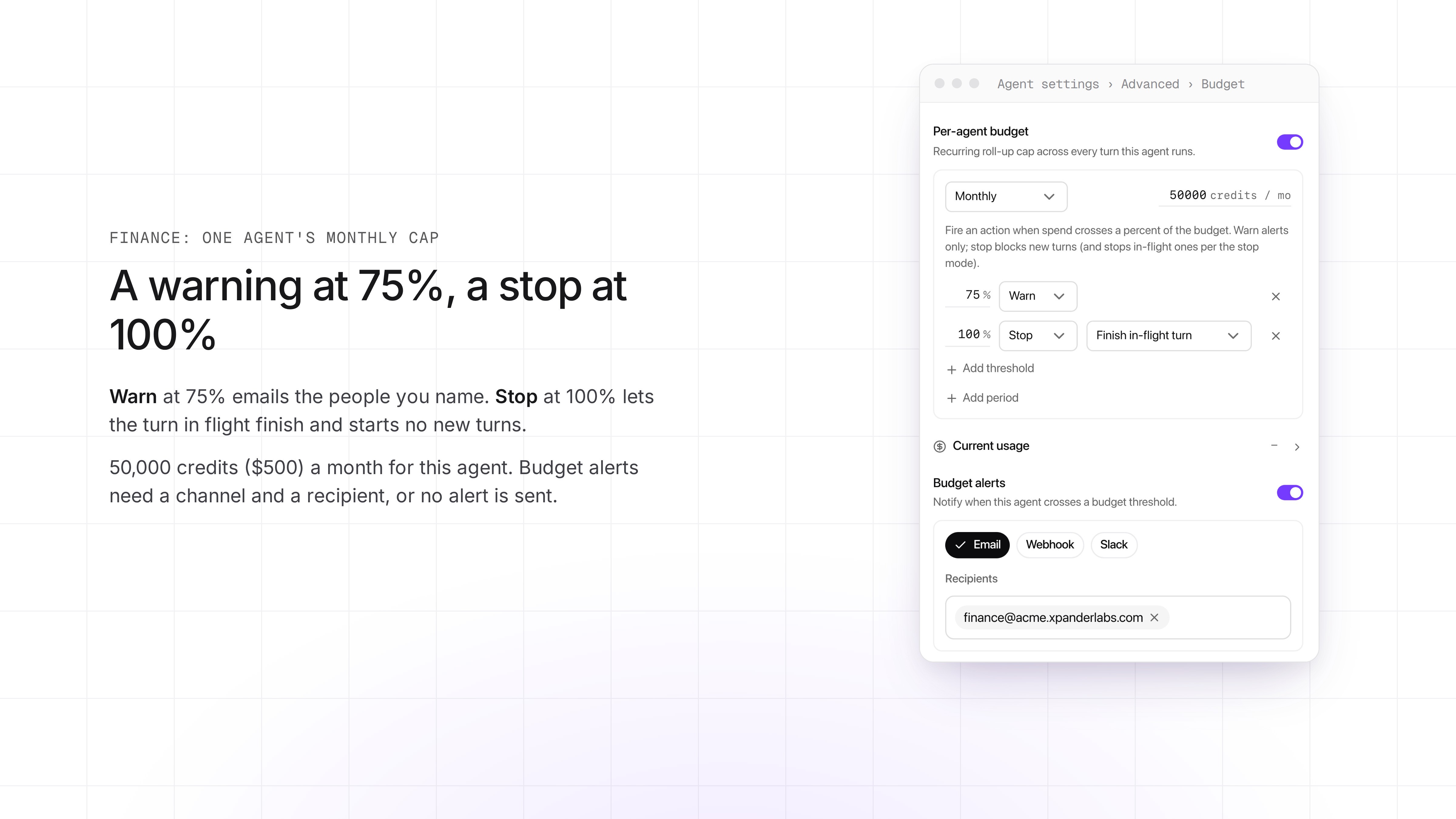
A monthly cap of 50,000 credits ($500) for one agent: a warning at 75%, a stop at 100%. The turn in flight finishes. No new turns start.
See how xpander fits into your AI stack, or book a demo.
What this does not cover
Claude Code, Codex, OpenCode, and apps built on the OpenAI and Anthropic SDKs can send their model calls through the LLM Gateway, with budgets and aliases. When people run them on their own laptops, local files, shell commands and tools stay on the laptop, outside approvals.
When a person signs in with their own Claude subscription, those calls count toward no budget. The person pays for them on that plan.
An alias works for people's tools and apps. An agent's model is picked from the list of models. It cannot be an alias, so it has no fallback. When a model retires, someone who can edit each agent picks a new model, one agent at a time. A conversation that is already open can stay on the model it started with, and fails when that model retires. Start a new conversation.


